Is there no way to “run” the arpeggiator and sequencer from MIDI - using MIDI as “keyboard input”. Seems like the MIDI notes in bypasses the arpeggiator and sequencer. It would be nice to have an option per setup whether MIDI in should bypass the arpeggiator (as now) or not.
On my setup, at least, it seems to work like you want it to.
I send MIDI notes to the Sub 37 through the USB connection, and, with the Arp turned on, it arpeggiates the notes.
(“MidiKeys” on the Mac)
I used an O2 midi-keyboard connected to the Sub 37’s MIDI DIN in, and played the Sub 37. When the Arp was turned on, it arpped.
I assume the Sub 37 is playing the notes from your external controller, so the connection, cable, and MIDI channel must be good.
Maybe the Setup / MIDI Settings got tweaked? Mine has “In Ports” = both and “Out Ports” = both, with all “Echo DIN” and “Echo USB” turned off. (not that the second one should matter, I think)
It would be nice to have an option per setup whether MIDI in should bypass the arpeggiator …
I agree with that. A nice option! Maybe something like: input to the ARP from keybed, merged usb+din, both?
There is kind-of an option like this, although it’s not perfect.
If LOCAL CONTROL is OFF, then the Global SEQ OPTIONS menu item, MIDI OUTPUT, actually controls whether incoming MIDI bypasses the arpeggiator or not.
Local Control OFF, Seq Options MIDI Output = SEQ, means that local (keyboard) notes go through the arpeggiator and the arpeggio is output as MIDI. external MIDI notes sent to the Sub 37 are played directly.
Local Control OFF, Seq Options MIDI Output = KEYS, means that local (keyboard) notes bypass the arpeggiator and are sent directly out; meanwhile external MIDI notes sent to the Sub 37 are sent through the arpeggiator.
If Local Control is ON, then both external MIDI notes and local notes are sent to the arpeggiator. With Local Control ON, Seq Options MIDI Output only affects MIDI output from the Sub 37 when the Arpeggiator is on (sending out arpeggio MIDI or just the MIDI notes played on the keyboard).
This is admittedly not simple, but the goal was to provide maximally useful behavior by default without too many setup options, and avoiding combinations of settings which aren’t useful.
Here’s a diagram that helps me see the connections that Amos described above. Errors are mine, of course.
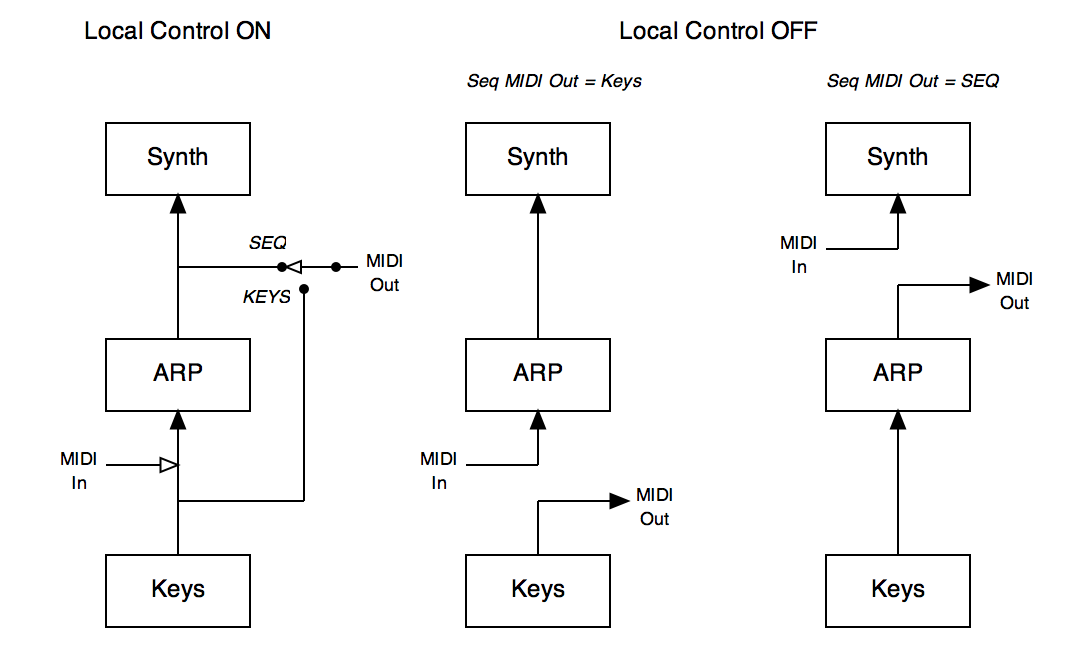
This diagram and explanation was very useful, and with this in the manual (both for SUB37 and plug-in) a lot of confusion could be avoided I think.
But the implementation is really great - so again thanks for having thought this through and enabled all the combinations. Really good job.
kr
Morten
Thank you very much for the Diagram!
I just referred to this diagram again to troubleshoot some issues I had with using the Sub 37 as midi controller with LOCAL off and using the sequencer. This should go in the Sub 37 Manual 1.1. It’s most helpful.
This diagram but with the plugin/editor flow as well should be added to the manual. The diagram helps but now I’m wondering about the flow with the editor