Hi Amos, thanks for the update. I won’t be able to test the new VI build until next week, but I will write back here then, and I’d be happy to test stuff / help out finding the bugs.
It’s really odd that apparently the version of the editor sent when registering isn’t apparently the newest version, and, it seems impossible to find the newest version. Sigh.
Anyway, I am having issues with the disconnected message, using Ableton Live on a Mac running Mavricks. In Live itself, the editors says disconnected, though the knobs do effect the proper functions, the library functions for selecting or saving sounds do not work, in stand alone mode, nothing at all works.
I have the newest firmware installed and version 2.0 of the editor. Can anyone link me to a more stable editor version?
This is actually really odd, and a first experience with Moog stuff not working as expected, i’ve owned most of the Moog synth line, and this is the first time I have been kind of let down so far.  The synth is awesome. The editor… is broken.
The Subphatty VI plugin works for me in REAPER, finally  , just add the plug, and set the audio input..it works, tried also a few cc parameter (filter, decay etc.) automation and it seems to work
  have to try it for a few Days now
i’ll write down some issues below:
Subphatty don’t like when using this:
- Keyboardoct automation
where can I find the latest version of the ‘Mac’ Sub phatty editor?
edit I have 1.1.0 is that the most recent one?
Hi dhocks76,
version 1.1.0 is the most recent one for the Mac.
I assume VI is Virtual instrument,right?
Well Cubase 7.5 didn’t see it after move it to the vst folder.
The “FX” editor seems to work fine.
Hi Amos
I have tested some more now with the latest plugin builds you shared (October 2014 build), here are my results:
VSTi (VI) - 64-bit:
- loads fine in DAW, editor showing firmware 2.0.6 and editor version 1.1.0
- but then: after 2-3 minutes I get “hardware disconnected” again.
- further i see in Windows Task Manager that the process “Sub Phatty MidiPortHandler.exe *32” now is stuck, even after closing DAW and shutting off the synth
- killed the process, restarted synth and DAW = same result after 2-3 minutes.
- automation of more than 2 parameters: I managed to automate 3 parameters without glitching, seemed to work better now, but because it crashes after a short while I am not sure if it is solved, needs more testing.
Q: Could the fact that “Sub Phatty MidiPortHandler.exe” is running in 32-bit mode, and everything else in 64-bit - cause problems?
So a short summary:
- March 2014 build of the VI: most stable version (not getting hardware disconnected), but automation of more than 2 parameters causes glitching.
- October 2014 build of the VI: hardware disconnected after 2-3 minutes, but automation seems to work better.
- Custom moog USB driver: does not work at all for me (Phatty not showing up in midi device lists).
This is all tested running:
- Sub Phatty connected to native USB 2.0 port (earlier USB 3.0, but switched to a 2.0 port because it generally seemed way more stable).
- Firmware 2.0.6
- 64-bit versions of the plugins (VI + VST)
- Win 7 64-bit with SP1, running Renoise 64-bit.
- NOT RUNNING: the custom moog USB driver for windows.
Amos, was some of this ^ helpful? Let me know if you need me for more testing, I have plenty of time the next 4 days.
Hi, thanks for the detailed feedback! It’s definitely helpful. I will work through it and be back in touch ASAP.
All the best,
Amos
Any advance on this?
I am using a Mac Pro late 2013 (Yosemite 10.10.2) with the 2.0.6 firmware and 1.1.0 editor and I constantly get hanging notes (when changing patches from the librarian) and frequent hardware disconnects. Would really appreciate this getting some attention. It’s just frustrating as I sit and watch my warranty expire with the potential of a hardware problem.
Many thanks.
As a happy owner of the SubPhatty I am also curious.
@Amos
Can you tell us please what is the latest version of the SubPhatty en the Editor?
There are so many post about this subject and I think it would be clear to find it at the Moog website instead of
searching topics about this in the forum.
Also will there be a update of the SubPhatty?
Thanks in advance!
There is no need to post the same question every couple of weeks. My reply to http://forum.moogmusic.com/viewtopic.php?f=7&t=23028 is still current.
I just updated firmware on my Sub P, so just to make sure, it’s not supposed to start some auto-calibration after the update, right? Like on the first update?
Being exactly 12 months since the latest (beta?) updates for the Sub Phatty were posted here : http://forum.moogmusic.com/viewtopic.php?p=135239#p135239
Plus some time since Amos posted “at least a small update is guaranteed before too long. ” found here 11 Mar 2015 (7 months ago) http://forum.moogmusic.com/viewtopic.php?f=7&t=23028&hilit=sub+phatty+update#p140476
This would be a great day for some solid news!!!
7th October = Worldwide Stable Software Day
That’d be some terrific news to hear. Firmware rev 2 mappable CV inputs!
Chris
Still hoping for a ‘drift’ setting like the Sub 37 has. I was just thinking the other day it would be handy to be able to even just modulate the beat frequency so it’s always drifting in between to value ranges instead of just being static. Guess I could automate that in a DAW though
Still waiting for Sub P poly chain
I reckon this is a dead issue? My SP still can;t connect reliably to the editor or any vsti to work as a midi controller, as advertised.
It’s a big bummer for me as this is why I chose the SP over other synths, to have both the Moog engine and then to use on the comp…
sold my other controller.
I kept my Sub because it’s still very good as an extra oscillator for the Sub 37. But still … would be nice if could poly chain it. Then again there may be enough differences between the two where the results would be less than expected. I think it wont happen now. Will have to look at some other good alternatives for poly.
I never had a problem with the editor so that’s ok for me. Never used it as a controller, have enough of those already.
Hi,
I just bought the Sub Phatty a little over a week ago and have been struggling with the VST editor within Ableton. I updated the firmware to 2.0.6. What’s interesting about that is 2.0.6 isn’t listed on their main download page–2.0.3 is the firmware update they have on that page. I found 2.0.6 on this thread. Why isn’t it on the main download page? I also updated the VST’s to be 1.1.1, which allowed both the Sub Phatty Editor(x64).dll and the Sub Phatty Editor-VI(x64).dll to be seen in Ableton. But alas, neither connect to the hardware when I drag and drop to a MIDI track. I get the “Could not connect to Sub Phatty MidiPortHandler !” message.
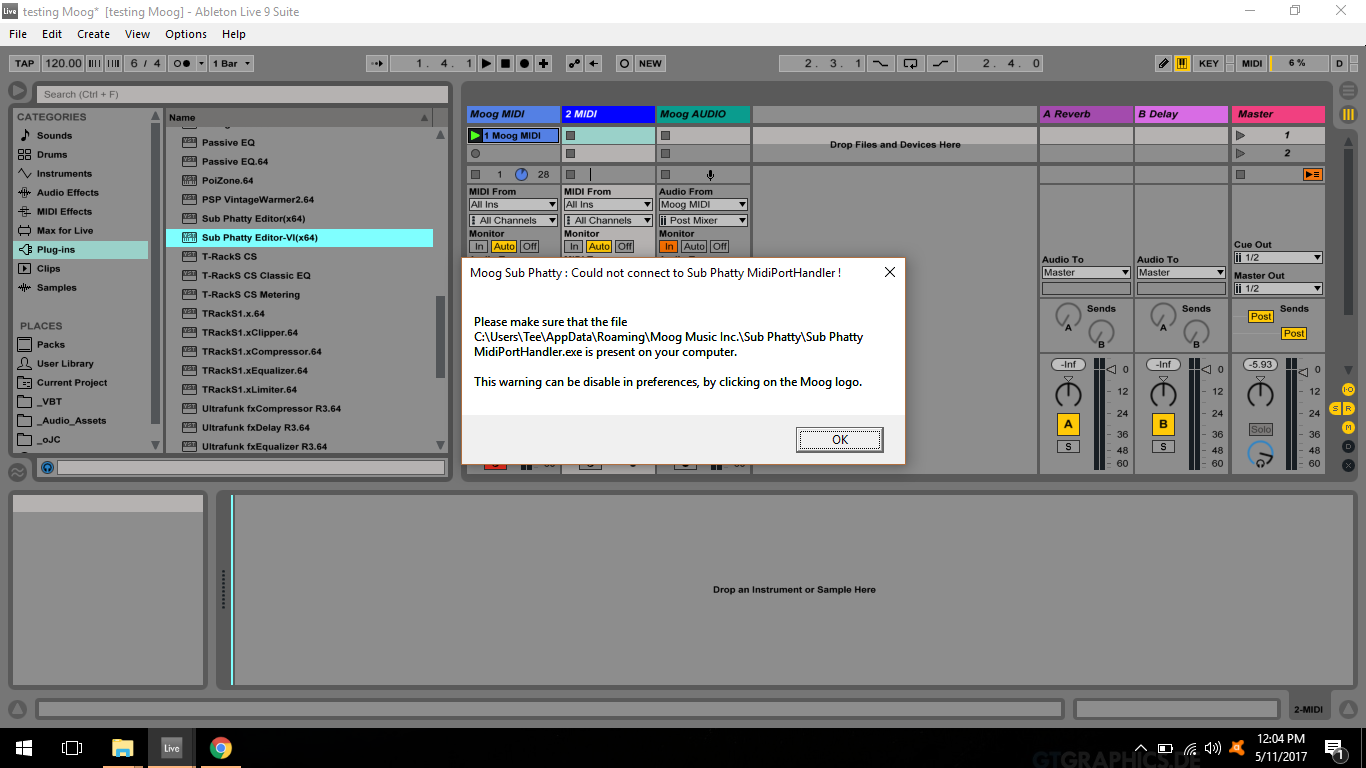
I’m using Ableton 9.5 in Windows 7 64bit. My audio interface is the Focusrite Scarlett 2i4.
What’s the current situation on the editor VST? Am I just not going to be able to use it or am I doing something wrong? I welcome any detailed guide on how to get this properly connected. Thanks!