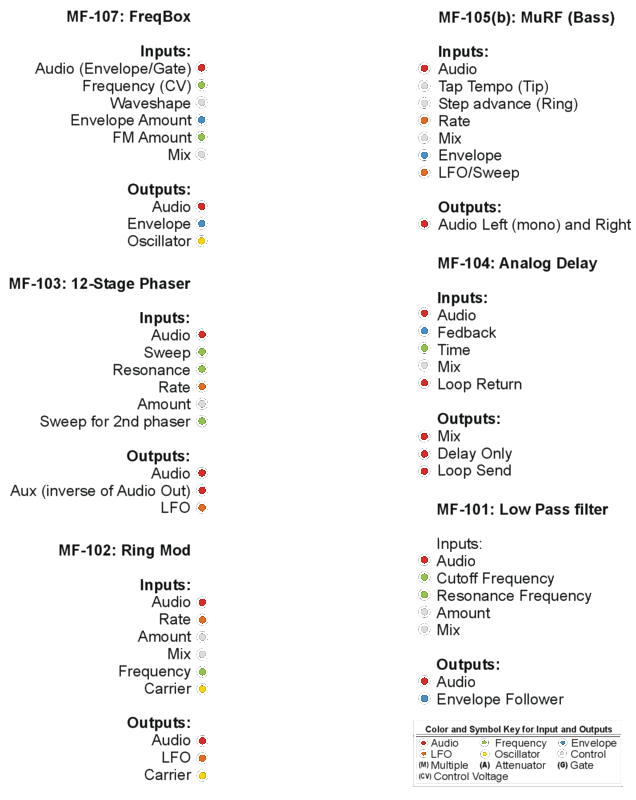
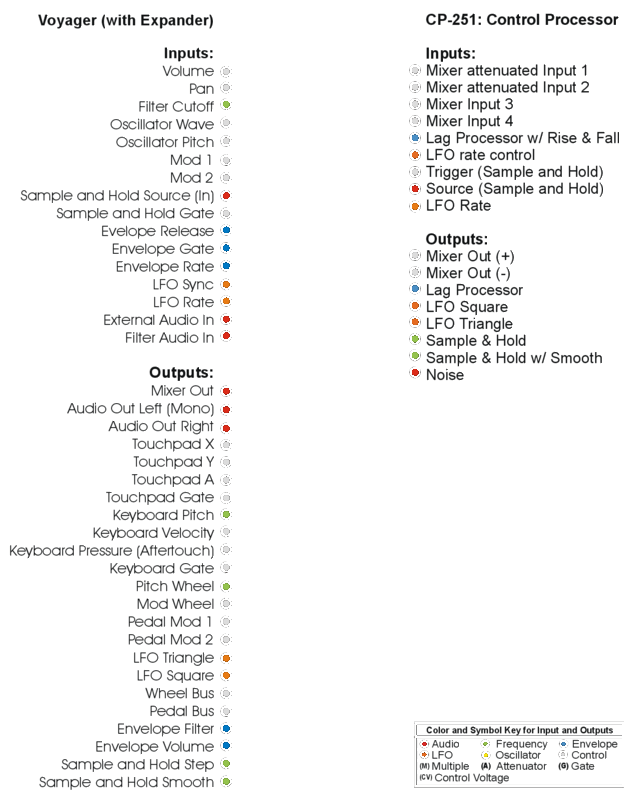
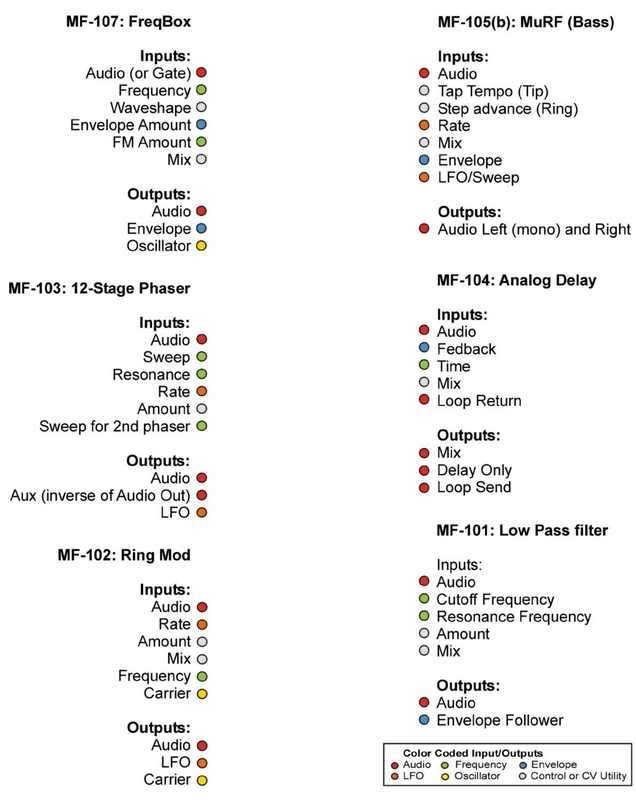
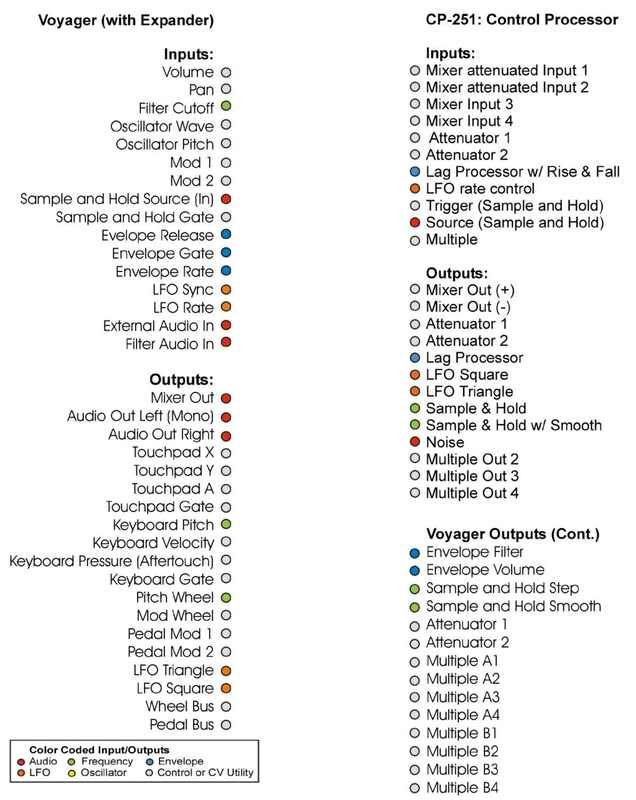
I have seen things like this done before and it was well done too (from programs to line drawings of each Fooger). I give credit to those who came before me on this. I am posting a simplified (signal path only) version that is easy for me to use. I am sure it isn’t perfect, feel free to offer advice on how to make it better.
I listed all of the Inputs and Ouputs of each Fooger, the CP-251 and the Voyager (with the Expander). Then I made a circle next to each item to represent it’s jack. This way you can draw a simple line to show a signal or audio path. I also did a simple color code to help identify a generic purpose category for them with a key at the bottom of each. The colors and key could be reworked if it seems worthwhile.
You can print it out and write all over it, or you could use a graphic program and save trees. Either way, enjoy!
Make “accidentals” or some symbol that designates something like sending it to a multiple, or an attenuator perhaps (theyd probably get their own number though) This could show the signal path. So you will follow the number 1 from its source to its destinations.
For instance, it could be redundant to identify certian multiples. THe VX 351 has 2 and the CP has 1. Same for the attenuators but those need values. THat way you don’t have to hook it up exactly the same way but the effect is there.
I love coming up with ideas, but sometimes if you can’t see what your ideas look like when practiced you can’t find obstacles they might create.
Ill keep my eyes open. This is a great thing to do because we all can greatly benefit.
If we all had some kind of standard patch sheets for our Moog gear we could more easily share ideas. I also think that its all inclusive because if you ahve everything listed, if someone like myself doesn’t have all of the Foogers then we can still work with what weve got.
It coudl very well encourage people to buy more foogers too lolol.
More great ideas, thanks! I like the idea of making symbols for generic but useful items like multiples. That would take even more of the clutter away.
Maybe writing an “M” with a number to signify which Multiples you grouped them with.
“A” or “P” for Attenuator or Pot?
I was wondering if it should have everything or be seperate files for each unit. You could have 3 FreqBoxes, then you don’t need 3 sheets. Still trying to figure that one out. So far it has really encouraged me to want a Voyager!
I don’t think you needed encouragement for your Voyager lust though.
Try to make a patch like this..im using the Micro as an example because gate needs attenuation.
Micro keyboard gate to multiple
mult 1 to attenuator 1
mult 2 to atten 2
atten 1 to 107 freq in
atten to ring mod Osc in
107 osc out to CP mixer in
102 carrier out to cp mixer in 2
Mixer out to Audio in
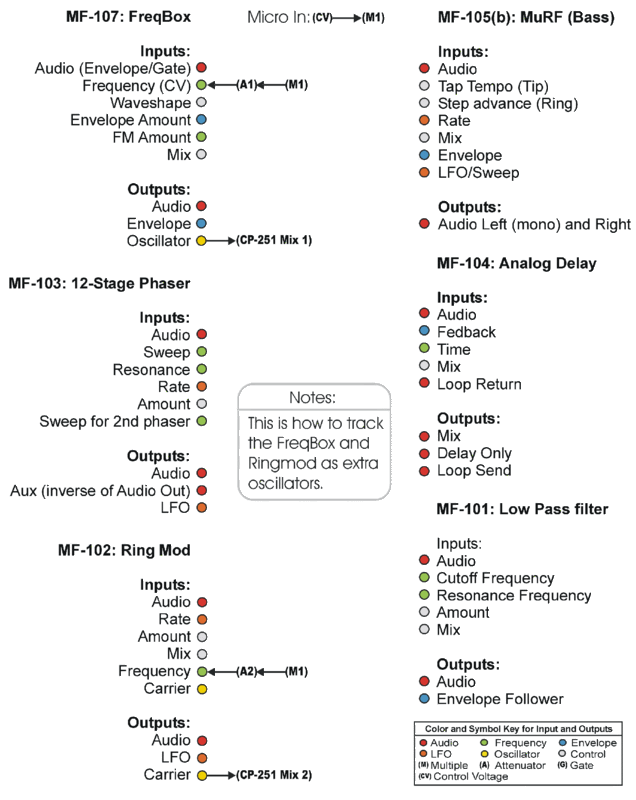
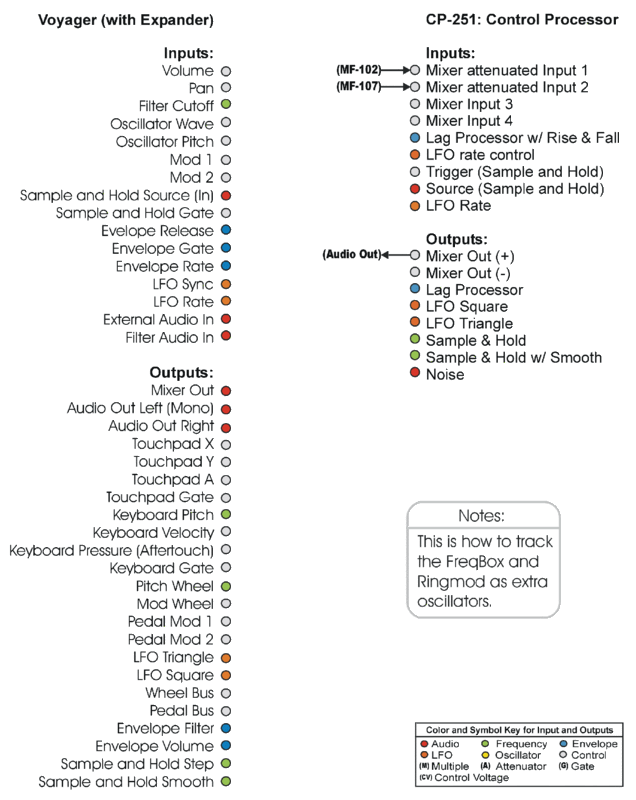
THis is how youd get the Freq and Ring to track as extra Oscs for the Micro.
Your right, my Voyager lust is out of my control at this point.
Just to clarify your example:
When you say “Osc In” on the Ring Mod, do you mean the “Carrier In” or the “Frequency In”? I have never properly tracked the Ring Mod as an Oscillator, so I would have to guess at this one. I am guessing Freq In.
Also, you used a Gate as the input. Did you mean CV? The gate would be a 5v or Ov signal with no Volt per Octave scaling, so it would only track one high note and one low note, right?
This is a good example of a handy patch sheet for the Fooger Clan archives, I am planning on whipping it up and posting it here with our revisions to the symbols and system as well.
Here is the new version which removed all attenuators and Multiples and replaced them with Written Symbols. I also exported it as a GIF for the JPEG haters. The GIF or Photobucket stole my black outlines on the colored dots, ah well.

 The GIF or Photobucket stole my black outlines on the colored dots, ah well.