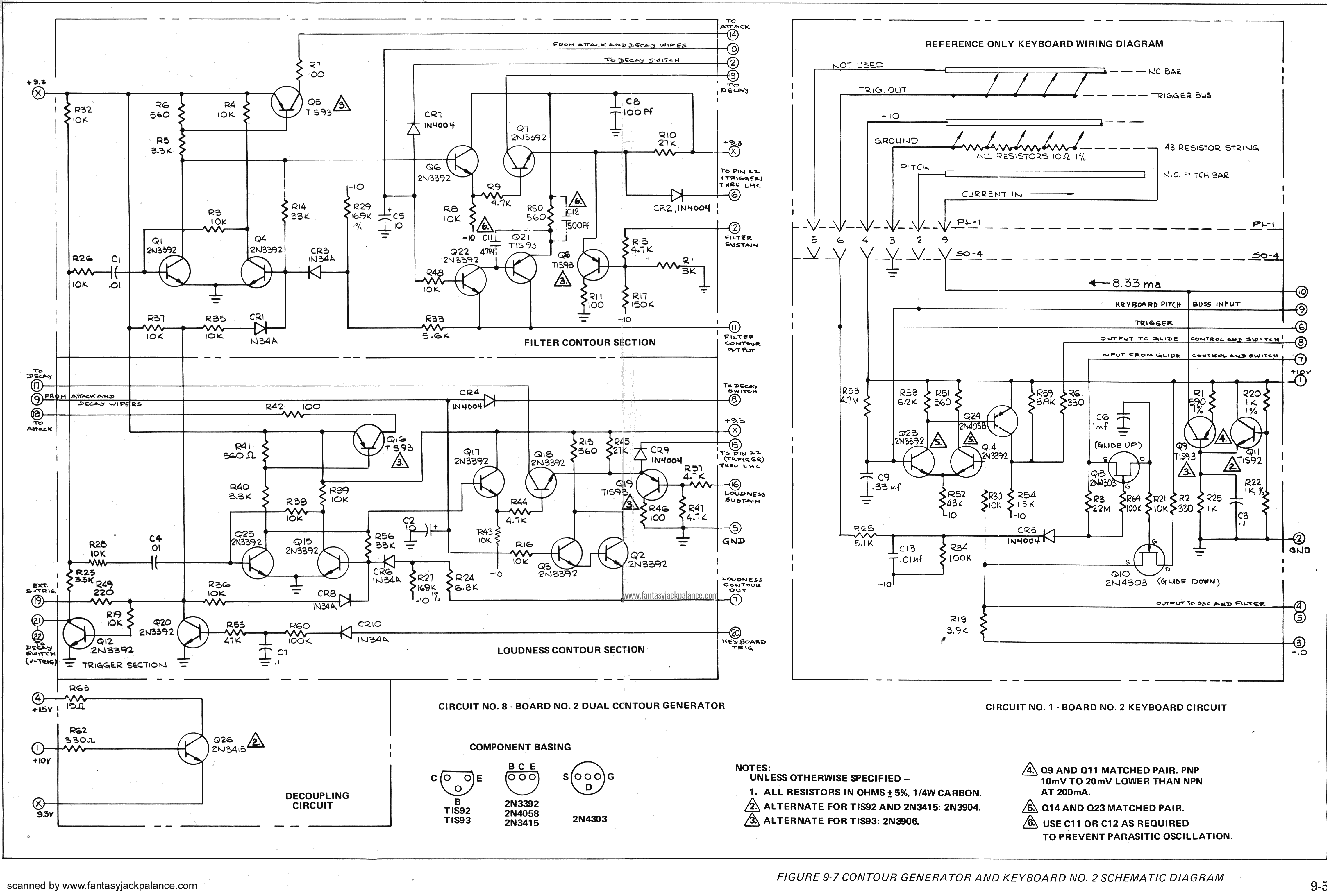
All 3 of the Minimoog Oscillators are bleeding into the VCA. The VCA contour will attenuate the bleed.
The bleed is sufficiently loud. Filter controls do not modify the bleed. Oscillator Volume controls/switches do not attenuate the Bleed.
The bleed appears to be the output of all 3 oscillators, you can hear the individual waveforms and their respective pitches.
[Edit: Mod did not cause these issues, see last post. ]
The keyboard no longer sends out correct CV voltage. It’s out by a semitone per octave.
The time constant of the glide down function is much longer than the Glide Up, which leads me to believe Q10(glide down) on the keyboard/contour board is fried.
I’ve fully reversed the Modification. The Oscillator board still tracks correctly via CV input but not via the onboard keyboard.
I also replaced the AC fuse holder, which was broken.
I have my doubts that the oscillator bleed is related to the keyboard/contour problem. I’m waiting for replacement parts to arrive. In the meantime, all connectors on the oscillator board/filter contour look good.
Dirty contacts, especially on grounds, can cause bleed-thru, offsets and other undesirables.
The edge connectors, both of the boards and connectors should be clean.
The same goes for the Cinch-Jones black Bakelite connector from the keyboard to the VCO board (for the keyboard tracking problem).
95% of problems inside a Minimoog D are due to poor contacts on connectors, IC sockets, trimpots, and keyboard springs and CV busses.
Another 4% might be defective capacitors and other aging components. The remaining 1% is due to inexperienced (or unlucky) tinkerers who foolishly try to mod their beloved Minis.
I feel like I am missing something here. The keyboard voltage still appears to be scaled, such that from C1 → C2 is greater than an octave.
Still contemplating my next move… any suggestions would be welcome
EDIT:
I’ve removed the oscillator board and have performed some voltage measurements for the CV (pitch) generated from the keyboard (measured at 9) and also done a voltage measurement for the CV being outputted to the oscillators (after being processed by the glide circuit + sample and hold measured at 4)
From the table above you can see that the voltage per octave is approximately 1.045V
Would .045 V per octave be significant enough for half a semitone out? I noticed on the Oscillator schematic the Oscillator board is expecting 1.02V/octave in
If it helps any - when I calibrate my Moog 951 keyboard - for 1v per octave - I use a voltmeter and find that adding a small extra amount - “.03” which stretches the interval - actually helps.
Cheers,
Tom
Pitch CV is a two way street: you can either have a not-so-precise Volt per octave CV source and still manage to calibrate the stretch tuning of the oscillators accordingly in order to get the keyboard to play in tune. But you can also start by having a very precise 1 Volt per octave pitch CV source and tune the oscillators from that. This would ensure that the oscillators would play also well with an external pitch CV source.
What did I wrote in one of my previous posts ? “95% of problems inside a Minimoog D are due to poor contacts on connectors, IC sockets, trimpots, and keyboard springs and CV busses.”
That is in part from personal experience, but mostly comes from the late, great tech, Kevin Lightner who had repaired and fixed dozens of Minimoogs in his too short career.
Anyway, that’s great news that you’ve finally found the culprit !
I have found this myself… when inserting the cards… there is a slight amount of movement left/right that those connectors allow… and the fingers seem to be spaces such that if you insert the card fully to one side, the other end’s captive sprung-claw can indeed just miss the very last finger, or make intermittent contact…!
hi! I see this is an old post but- was re-seating the card all you had to do to fix this? I have a 7— s/n and all my VCO’s are bleeding considerably. filter and mixer do not affect bleed amount at all and happens regardless of modulation switch settings. its getting louder and more unplayable as time passes. but I’ve reseated the cards in the past with no improvement. if theres something else you did (i.e. hardwiring something to make better contact) let me know.
Sometimes the connector flags can spread apart enough that they no longer make contact. That happened on my unit. Don’t try to fix it yourself, take it to a tech as they are easy to break.