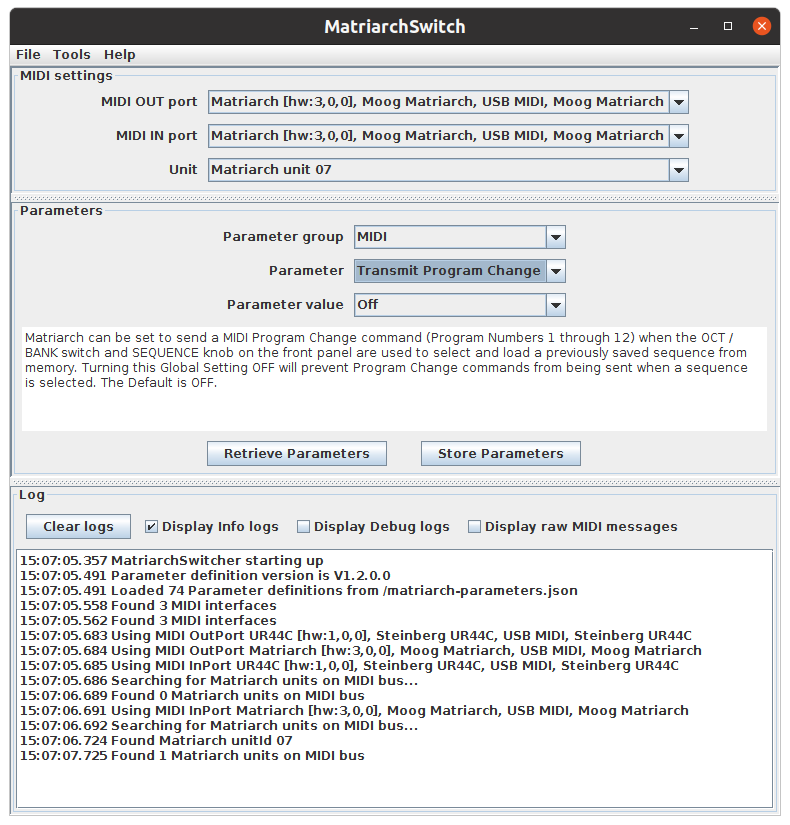
Please test it and let me know what you think. Of course the usual disclaimers apply: I cannot be held responsible if anything bad happens with your computer or Matriarch (but mine still work as before).
As expected, I have also found some bugs in the new firmware V1.2.0:
Message format for parameter reply from Matriarch is not as documented (missing Unit-ID byte)
The parameters give access to some settings that reflect the state of panel buttons (Osc sync, Delay sync etc.), but when sending them to Matriarch, not all of them are directly visible: For example when Delay sync is switched on via Midi, the time-LED blinks green, but the button does not light up.
Some settings seem very dangerous to change via MIDI: For example you can disable MIDI transmit or receive. I grouped these parameters in the group “Danger Zone”.
The parameter definitions have now descriptions from the manual added (except for 2 which I could not figure out).
USB Midi works OK, connecting the Matriarch with DIN MIDI does not work due to a firmware bug (workaround: enable Transmit MIDI Clock).
It doesn’t work, the Matriarch is connected by a usb cable.
When I click to retrieve the settings, the data is not accurate. When I want to send changes they are not taken into account.
log :
19:43:07.185 Unable to use MIDI OutPort Moog Matriarch, External MIDI Port: javax.sound.midi.MidiUnavailableException: There is not enough memory available for this task. Quit one or more applications to increase available memory, and then try again.
19:43:07.190 Unable to use MIDI InPort Arturia KeyStep 32, No details available: javax.sound.midi.MidiUnavailableException: There is not enough memory available for this task. Quit one or more applications to increase available memory, and then try again.
19:43:07.194 Unable to use MIDI InPort Moog Matriarch, No details available: javax.sound.midi.MidiUnavailableException: There is not enough memory available for this task. Quit one or more applications to increase available memory, and then try again.
Hi MrBlue,
you are running on Windows, right? The error message is misleading: When googling it, it points to the device being in use by another program. Please try again, with other applications closed, and browser tabs closed that could access Midi.
When MatriarchSwitch cannot open a Midi Port, it defaults to the “No physical unit (Simulation)” mode, which displays the default settings and ignores changes.
I have also been made aware that it does not work on macOS (java Midi port ignoring all Sysex messages). With a replacement lib it works fine on macOs and Linux, but has subtle side effects on Windows. Will create a new version when this is ironed out.
This was exactly what I needed – thank you so much. Java has come a long way since my college days when I last saw it (although I know it’s running a lot of things behind the scenes)!