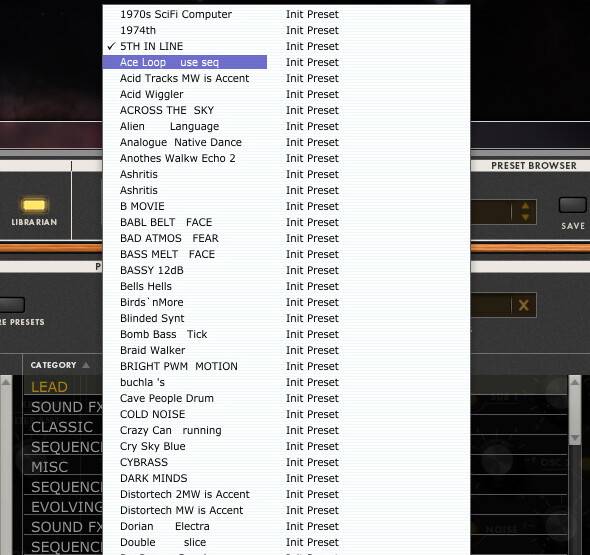
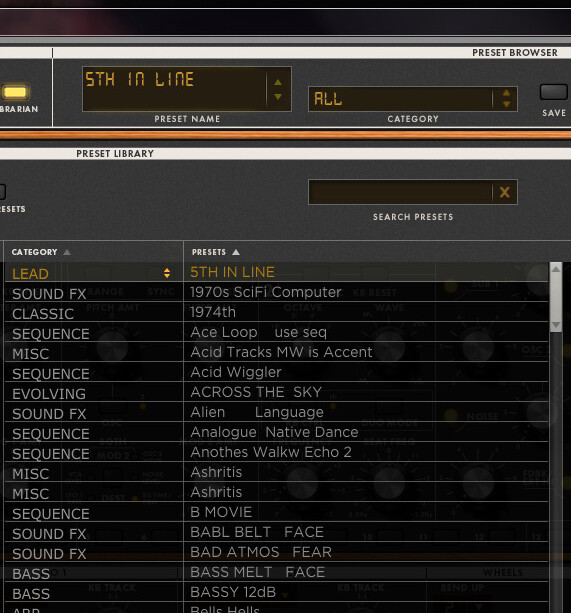
Clicking in the middle window from the librarian and sorting the presets. is not really ok.
When a preset name starts with a number followed by a letter, (5TH IN LINE) and the next preset is starting with a number (1970s SciFi Computer), The sorting is not ok in the editor.
Numbers has higher priority as letters…Or?
So when I have a preset with the name: 5TH IN LINE and a preset with the name: 1970s SciFi Computer, the preset with 1970s SciFi Computer should be first in the sorting, course of numbers has higher priority.
funny is that when you click in the Preset name (editor), (where you see all the presets).. There is every thing OK.
OMG…OK my English is to bad…I know…So here two pics of it.
First pictures is how it should be.
Second picture is the one How it is.
One other post what I post today with the new editor software, version 0.9.46. …got no answer on this one…
What do you think?
Hi,
Very nice presets but not all of them are ok for me.
When I delete them in the editor or move them to an other folder, is working fine.
Closing the editor and then starting editor again, All the presets are all back again.
It would be much better to have the custom Library presets as a separate package.
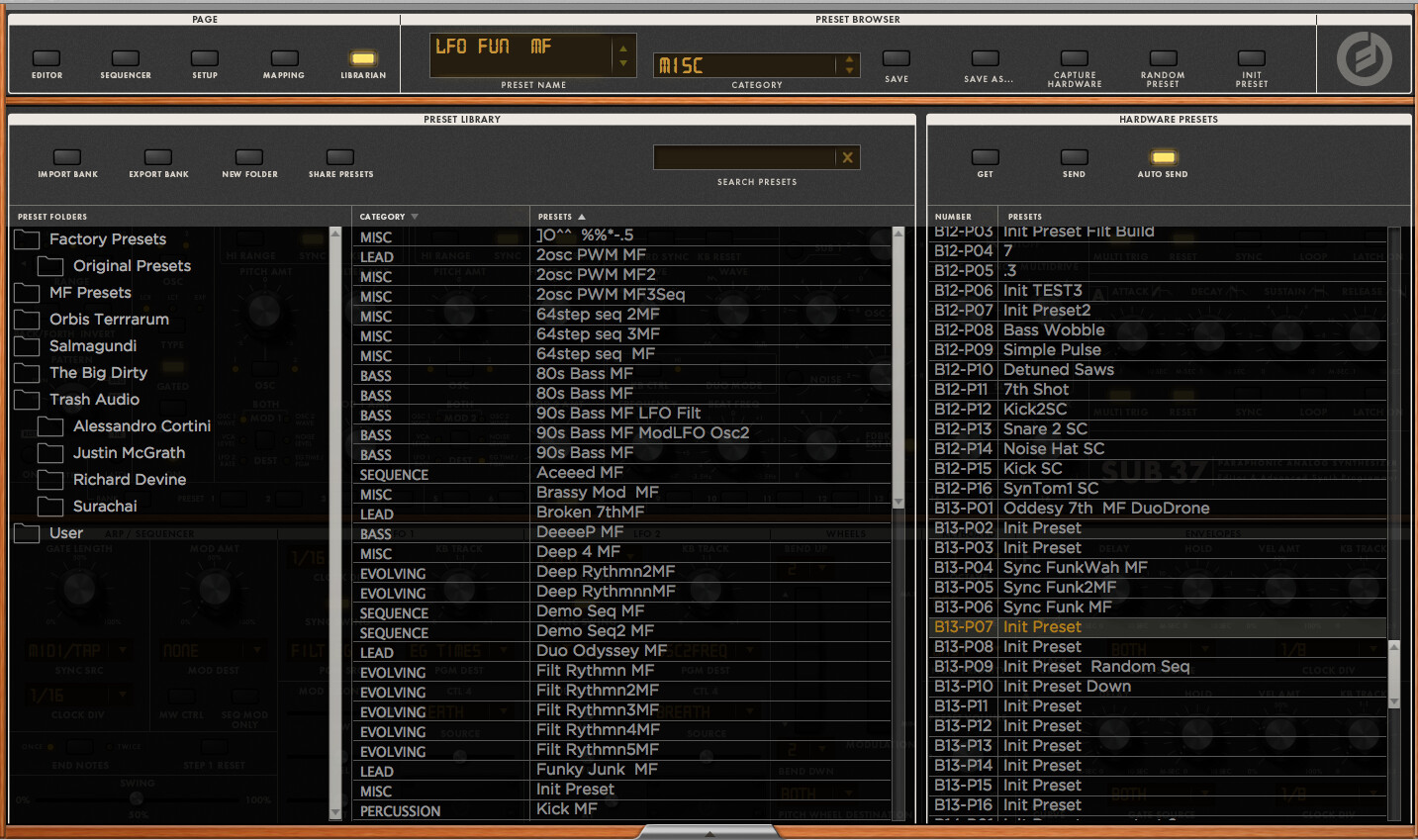
It might be due to having previous versions installed, but using this as standalone I’ve a couple of new presets that I’ve not used/sync’d yet with the editor which are showing as Init Preset, although the patch info is there. i.e. the sounds are correct but the name on the hardware Preset panel is ‘Init Preset’.
Capturing the Hardware from changes the name in the top browser panel, but not in the hardware presets panel, which is still ‘Init Preset’
On the attached screen grab you can see the name in the preset browser is LFO FUN, but in the hardware panel patch 13-07 is still ‘Init Patch’. 13-07 is the loaded patch btw.
The synth shows the correct names, and loads the correct sounds from either the editor or the synth itself..
Renaming the patch from the hardware panel has now initialised my patch… duh! shouldn’t have tried that!!
Changing and renaming the patch on the synth then updates the editor.
Thought it was worth mentioning in case the first install of the editor doesn’t capture properly and folks lose patches - but more likely its to do with having previous installed versions. I remember having to clear the folders a while back for similar reasons, but maybe worth a mention in the set-up docs if so.
Thank you so much Gil… I found a way to Customize this “custom bank”
Just make them hidden..but is not the normal way
No need to change this product design…It should be like this. Every software designer put his custom presets in the software…
Dear Amos..
But when the possibility is there in the editor..Moving presets…copying presets…deleting presets..Making new folders for the new custom presets…and so on…
Then it has to work fine..and not when you start the editor again…and all is up site down.
Just want to thank you for this awesome product and We hope it gonna be a splendid success.
I am from Belgium and think a bit different…
After installing the latest firmware, when I turn the Fine Tune back on the middle position, the C is pitched as a B flat + almost 50cent.
I´ve had this issue in another firmware edition as well, but not sure if I´ve had it every time I´ve upgraded..
I´ve tried turning it off and on again with the Fine Tune set to a minimum when shutting it off or on, but haven´t been able to recreate the issue once more, so maybe it´s just like this the first time booting after firmware upgrade now. Last time I had this experience was on stage, so I had switched the power off once (or more) after firmware updating.
These problems below still exist on my build plus this release added when ableton “flashes” through the automation lanes or automation line stops moving issue ( the issues listed below) then usually the second automation lane changes from what ever parameter i have it set to the default “device on” lane. That didn’t happen on the previous builds.
Ndoe wrote:
I guess i have something I’ve noticed and i might be late to the game but when I use the AU version on my build below the automation works as you would think like other plugins in Live. I touch the knob with the mouse or on the sub 37 and ableton automatically detects what I am adjusting and brings up the current automation lane displayed. When I use the VST version the behavior doesn’t work the same. Live does record the movements if i use the hardware or the mouse but i have to go into the I/O section and find the automation manually. If i use the mouse to select the parameter/ knob on the plugin it will then bring it forward. I am just curious if this is normal behavior or not.
All of the other AU and VST i have operate the same with the mouse or a hardware knob midi synced. Ableton will bring the parameter I am adjusting to the front. It works on my rob papen, NI and others. So the VST sub 37 Editor doesn’t function the same as AU plugin in that manner.
I will post a video to show an example of the two below to help understand what i mean:
I also noticed in both the VST and AU version if i enter in 5 automation lanes in Live i.e ( cutoff, res, mod 2 filter amt) the main channel lanes will flash between the different automation lanes. In the video I have 5 lane of automation and it always seems to rest on resonance automation lane in the past 3 builds.
While doing this test i noticed it i edit the automation while it is playing ableton stops picking up the movements on the synth. It will still record midi cc in the individual clips but it stops picking up automation. Looks like if i draw in 3-5 separate lanes is when it loses “connection” almost every time. I can still use the mouse to draw in envelopes and the sub reacts to it so it is receiving the automation. Mid way through on this video when the automation line jumps i am moving other knobs so it is reading that i am moving other knobs, but the automation line stops moving.
Request: In LIbrarian > ‘Hardware Presets’ (in the Right hand section of Librarian): It would be useful to have option to sort presets alphabetically via triangle curser like the curser in the ‘Preset library’ (in the left hand section of the Librarian page).
How do I use the Editor in Studio One on Mac? I have added an external instrument and assigned it to the S37, as well as added a keyboard device and assigned it to the S37 but no GUI.
I have a Moog folder in my Instruments list but my Minitaur Editor is the only thing in there, no S37. Is the BETA a manual process or something to get it to show up in S1 perhaps?
Eveything seems to work very well, congratz to you all.
Only thing, i had to enable the wheels and panels in the midi out section to get the editor to respond in live, and enable the keys, panel and wheels on the sub to get it to respond to the physical buttons. makes sense to me, i don’t want the physical unit responding with the latency of the software.
However, your manual seems to suggest almost the opposite method (disabling local control). but that doesn’t work for me.
i amusing Win8 64bit, Live 32bit version, and sending midi note/clock/ editor in and out all via the usb
But the way it’s setup everything is working perfectly, so no complaints there
Two crashes this morning after adding S37 VST in Studio One 3.2 on Mac 10.11.3
Both crashes occurred while only having Minitaur and Sub 37 VST2 instrument tracks loaded. I was able to record a few notes on each lane and the app just closed without warning.
I decided to give the S37 Editor a fair shake and NOT include the Minitaur in this test. The Minitaur as it seems, is the issue with the crashing, but I’ll have to put that in as a possible bug for Minitaur.
As for Sub 37, the VST seems to be solid, but I have noticed an issue with automation.