Thanks for the interest. I would just keep an eye on here now.
I will be on Christmas leave from the 18th onwards, so will be making a start, with the first step being can I parse the Muse folder/data structures, reading and writing the data as needed with no corruption. Absolutely no reason why not, but that is always the start point. After that I’ll build the librarian, which shouldn’t take to long, as it is building on/adapting existing work!
Phase 1 was the rhetorical question of whether or not I can parse the file tree required by the Muse in terms of folder structure and file contents and recreate it. There was no reason why this should not be possible of course, but it needed implementing and testing.
So, I started this in my spare time on Wednesday, and as of today, I can parse the Muse Disk Mode file tree, finding and reading .bank, .mmp and .mmseq files and reading them into my “Muse Synth Model”, and I can recreate the file tree, even where the 3rd party libraries I have have a slightly different tree structure.
And in my testing, I am 100% correctly recreating the file tree for a patch collection, and testing shows that all files are correctly recreated and 100% identical to the source files.
Preserving the structure was important first off for importing testing, but now that works it might make more sense to recreate the file tree to absolutely match the Moog Muse file tree structure when saving.
I am also wondering whether to create my own .muse file format and import/export from that in terms. Why? It would be easier for users to manage single files rather than sprawling file trees. And I would welcome any thoughts on that.
So, I will now be moving onto the next phase now that all the lower level file code and testing is complete, which is to build the application that allows you to view and manipulate the data. This should not take long to get the basics going.
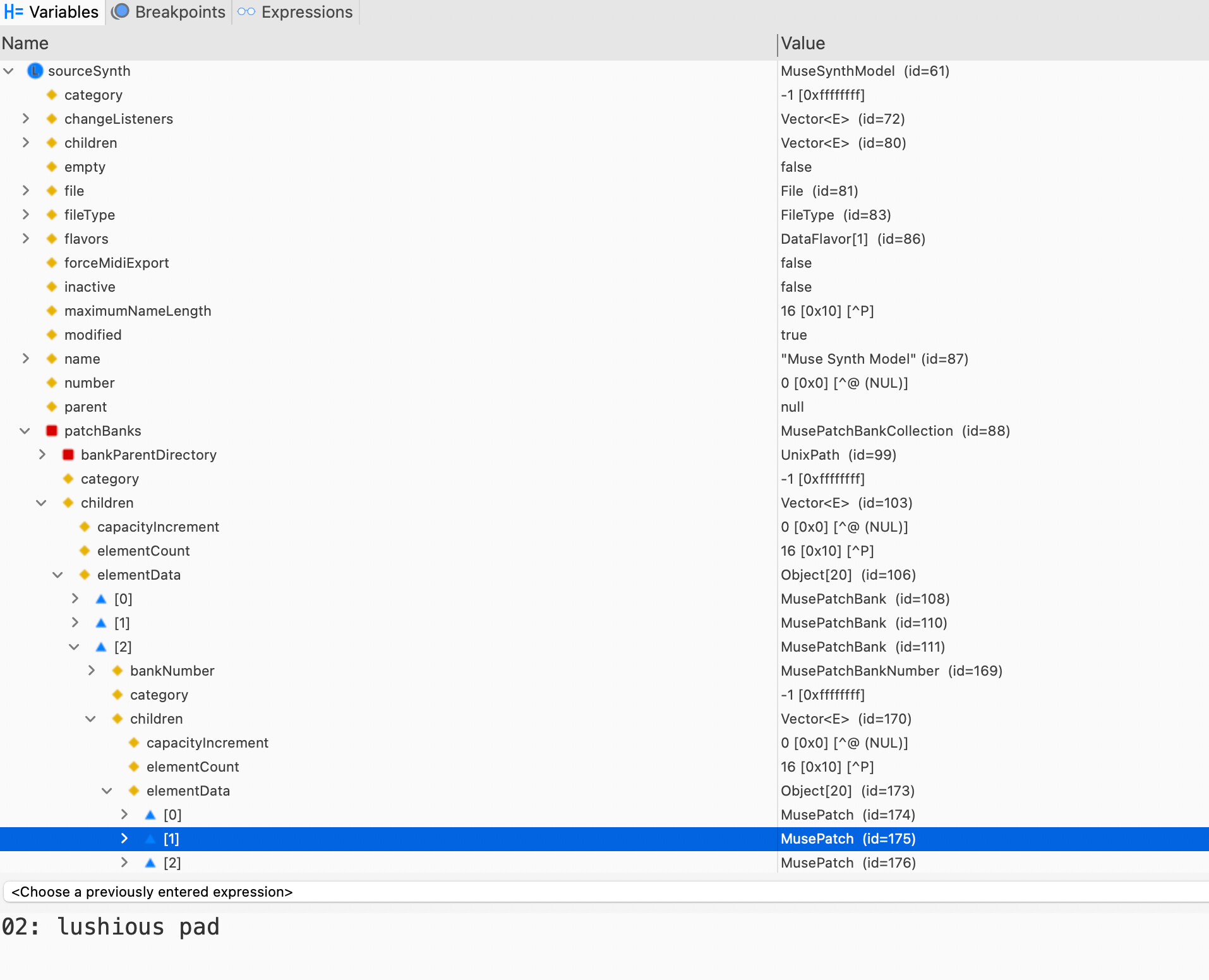
As a (technical) taster, below is an image from my development environment, showing:
The MuseSynthModel, which is my container for the Muse file tree contents, and in this case it is showing the factory contents. All of my librarians have an equivalent SynthModel relevant for the synth in question.
The Patch Bank collection
I have the 3rd Patch Bank open (note that collections are zero indexed)
I have Second patch selected, which is shown (as expected) as “luscious pad”
I decided to push on today as I did not have much else planned, and Phase 2 is now complete in terms of getting the basic user interface up and running to the point where I can open Moog Muse Disk Mode file trees and view them in the application’s user interface.
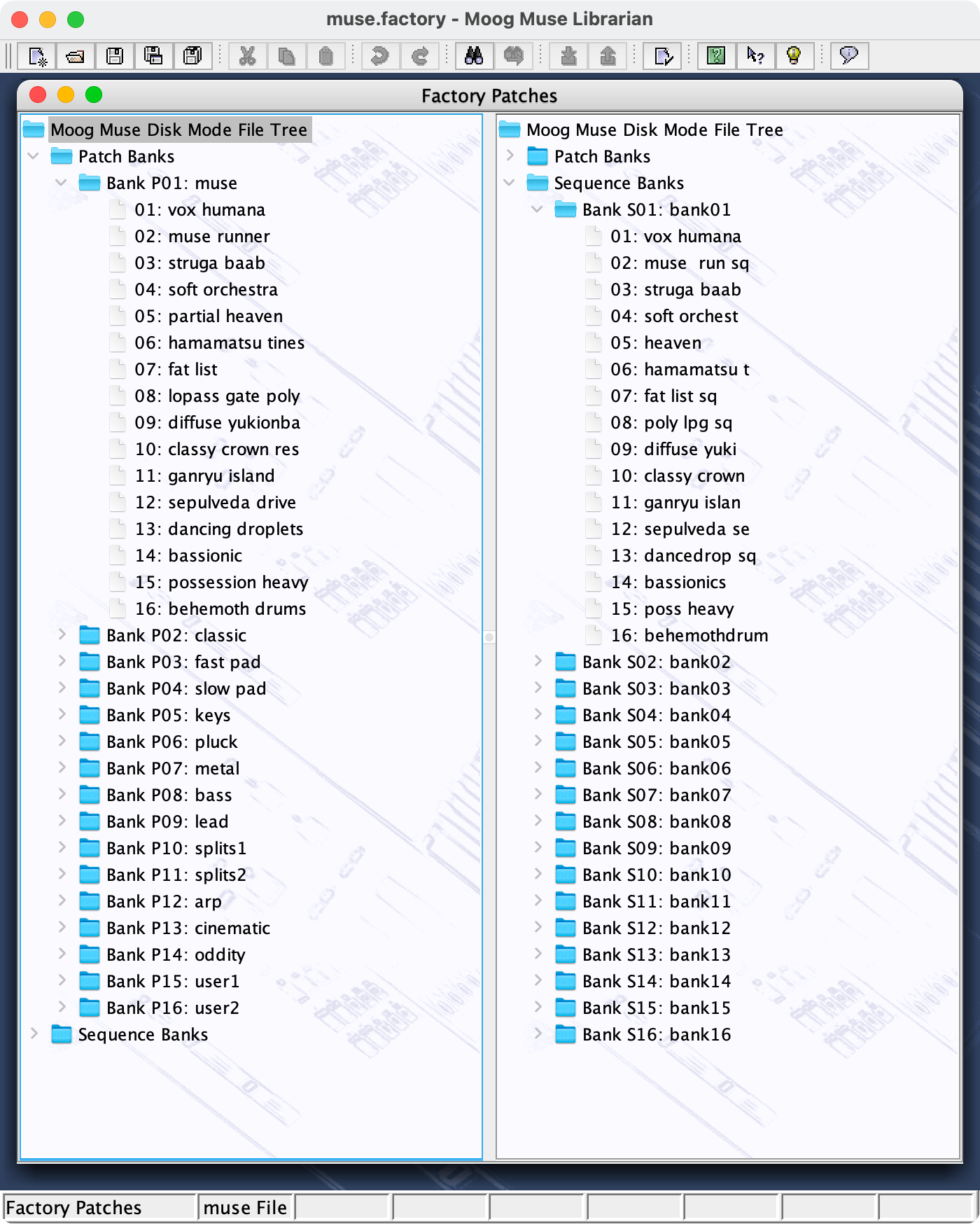
Below you can see a tree view of the Moog Factory Patches, in a split view with one side expanded to show Patches in Bank 1 and one side expanded to show Sequences in Bank 1.
Below is a similar view but now with two windows open; the Factory patches again and now the Luftrum Patch set (which I have to still audition!). Here you can see a dual view again, but this time the right pane is a table view, with Bank 13 selected.
You can see here in the Luftrum Set that muse.factory will only create the banks it finds. This makes it easy with the librarian to rearrange banks or renumber them.
The idea of this user interface is that it is easy to drag and drop objects either within a file or between files (in this case file trees).
So that is a huge step forward again. The next phase of work will take a lot longer, as currently a lot of code is commented out to get things working. I now need to go through things more carefully and ensure that all the editing features work. And there are all the ancillary tasks as well like screen shots, images, help and manuals, building complete applications for Windows, Mac OS and Linux, and so on. But I would hope within a month or so I will have a basic beta version I can post.
It’s probably worth saying now to please note that I do not provide my librarians for free, but they are priced reasonably for a lifetime license (all future updates are free). What I do offer is a free license for one or two users who are happy to help in beta testing. If you are interested in helping to beta test (when ready - right now this is alpha code) then please PM me.
I have a librarian in development for the Muse as per the above recent posts.
But I note you are asking about an editor, which I am not doing. I have zero interest in creating editors, for me, it is all about simplifying patch management on a very hands on synth when it comes to patch tweaking.
Thanks, Derek, for your dedication — I agree 100% with you.
For me, the editor is an easier and more useful way to visualize and understand what’s going on in a patch. It’s basically a way to visualize and learn how to create complex patches without the laborious task of navigating the small screen.
So when I reverse-engineer a complex patch and understand it, I can apply the skills I’ve learned to create a new patch on the Muse without using the editor.
Fantastic! Great work Derek. Really appreciate you and your work. Will consider Beta Testing for you and glad to pay for your librarian otherwise. Great contribution!~ best, D
No worries, our needs are different. I think the only synthesizer I have ever used an editor for is my Yamaha FS1r as that has the most convoluted user interface ever on a 1U Rack.
Things are going well. Everything seems to be working as expected in terms of basic functionality in terms of dragging and dropping within and between files, creating banks, etc.
Today I was getting into the nitty gritty like making sure that renaming patches follows what is permitted on the Muse; which is kinda weird, as patches take the name from the MMP file name (Sequences from the MMSEQ filename), which is in lower case, but they are displayed as upper case on the Muse and that is all you can enter. So I have had to introduce the behaviour of converting between lower case and upper case text and vice/versa when reading/writing files, and also update my object renaming functions to filter out lower case characters that are not permitted. And of course run my file tests to make sure that nothing was broken whilst doing that!
At this rate, a beta should be available by the new year, including a much needed dive into getting my librarians updated to use the latest Java version and other tools/libraries required for building the applications. So what I have on the cards now to complete is
Test all editing functions
Update help and images (currently copied from another Librarian to get things working)
Build applications
I think the only thing the first beta will not be supporting as it will require a fair bit of decoding effort is maintaining links between Sequences and Patches. The one cool thing about my librarians and why I started writing them in the first place is to maintain such linkages when you are moving data about. For example in my first ever Librarian, ex.factory for the Yamaha EX5, if you reorder Voices in an S1Y or S1A file then the Performance references to those Voices will be updated. Or if you copy a Performance to another S1Y or S1A file then the Voices it references can also be automatically copied (and references updated).
Looking at the Muse Sequences (which I have not really used much), it looks like Sequences can store a reference to a Patch, so it would be nice for Sequences to updated if Patches move about, but that will require a lot of effort to understand more of what is in an MMSEQ file, and the fact that Moog use text based files makes it harder than if I was just “peeking” and poking” a few bytes in a binary format. So I will probably leave that until a later beta release and not support it in the first one (I am guessing nothing else is doing it right now, so when I do get there it will be “the icing on the cake”!).
I even have the Splash graphic sorted, which makes it more real!
Just a quick note to thank you for your work on this, much appreciated!
I also wanted to ask whether the editor will work on PC as well.
A few weeks ago I contacted Moog’s support to ask if there were any plans for an official Muse editor. Their response was, “Not at this time, but I will pass on that it is being requested.” Based on that, I imagine it may take quite a while, if it happens at all.
Thanks for posting your information on your question and response from Moog. If nothing else, it shows I am not wasting my time if they have no current plans for one.
My librarians are built for macOS (my main computer and dev environment), Windows (my DAW and GIG PCs, and so tested on WIN11) and Linux DEBIAN package (tested on MINT), with also “raw” archives that should theoretically run on any operating system that you can get a compatible Java runtime for.
If you have macOS, Windows or Linux then you do not need to worry about Java as the Java Runtime Environment required by the librarian is included in the install package.
I’ve just finished sorting out the new tool chain for building - it is amazing how much “breaks” as tool versions move forward that then needs fixing! So once I have applied the new “build chain” to all of my current librarians, it will be back to muse.factory in the time I am spending on programming for the rest of the holidays.
I put a lot of intense effort in to getting things established before Christmas itself, and now between Christmas and new year it will be dividing my time a little more between programming and some music recording that is long overdue!
Thank you very much for the detailed reply and for clarifying the platform support, that’s great to hear! and reassuring to know it’s being tested across macOS, Windows, and Linux.
I really appreciate the amount of work and dedication you’re putting into this, especially juggling toolchain changes and development over the holidays. It’s clear a lot of care and effort has gone into making everything solid and accessible.
Thanks again for all the work you’re doing (don´t stress it too much! ), and enjoy getting some time back for music recording as well!
Christmas is the time when I have a few weeks away from work when I have some time to get into more time consuming programming jobs (where you need a good run at things, and spend a little more time in the studio (in the spring/summer months I prefer to be outdoors). My spare time in the autumn of this year running up to Christmas has mostly been completing a large studio rewiring job and introducing an AVB network of MOTU audio interfaces (two 16As and one 896), which I am seriously impressed with, and I now have all of my synths in the studio available as individually accessible audio channels in my DAW with all the audio interfaces streaming audio over the AVB network. So I am now ready to start making use of it.
I am one of the these idiots who cannot sit still for long - I have a very low boredom threshold!
I am signing off the year with some good progress on muse.factory, and as mentioned above, I also detoured into having to get my build environment for all librarians updated, which was as much as a faff as anticipated if not more so, but I wanted to do that before I release a new librarian. That is all done now.
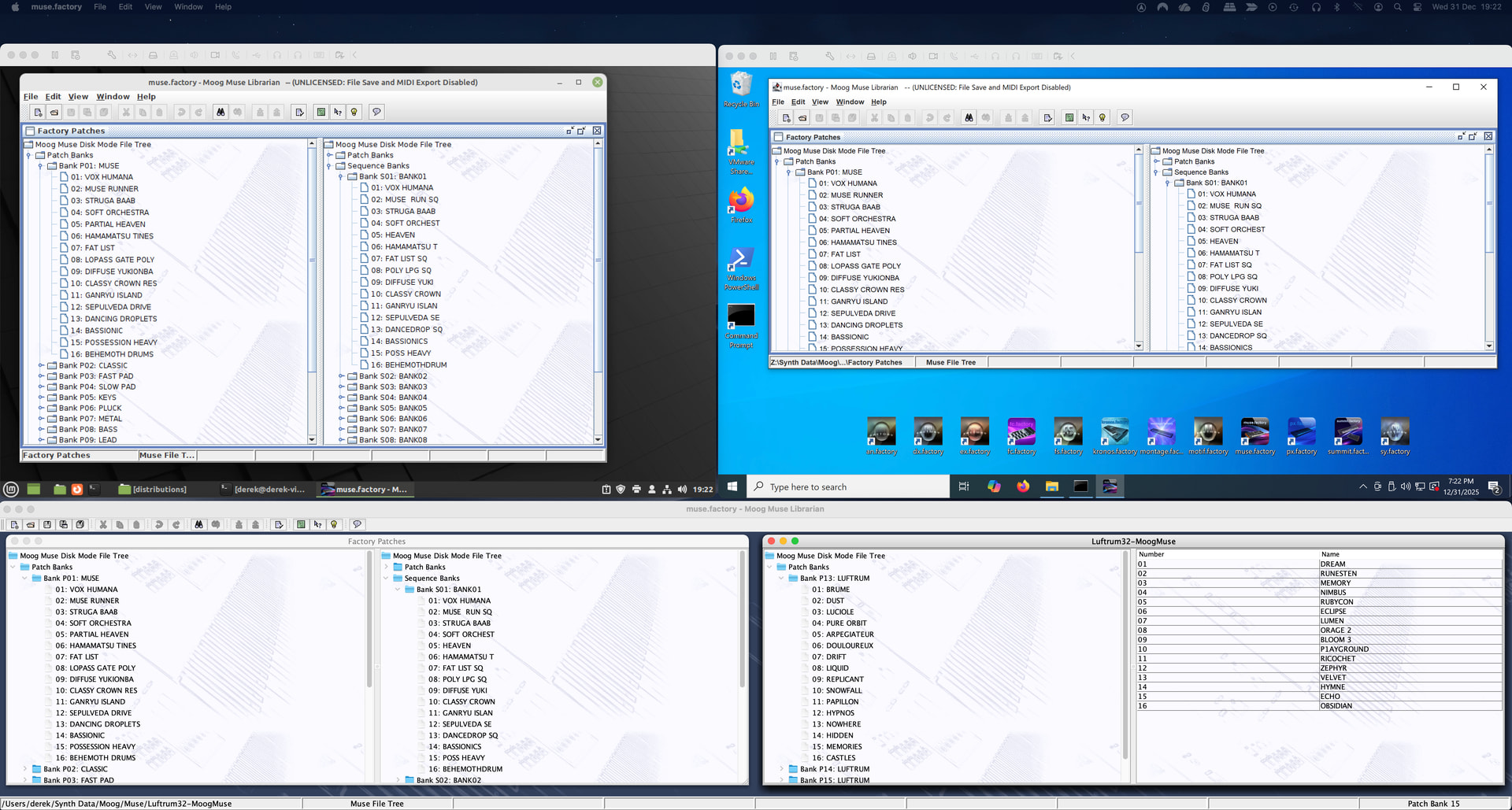
Anyhow, take a look at the screen shot below (click on it to expand). This is a picture from my iMac which is running a Linux Mint Virtual Machine (VM) and a Windows 10 VM, and all three environment are running a built application of muse.factory, installed by the relevant application installer for the OS:
Top left corner is Linux Mint VM with muse.factory installed from a Debian installer package
Top right corner is a Windows 10 VM, with muse.factory installed from an MSI installer package
Bottom of screen is native MacOS, with muse.factory installed from a DMG image.
I’ve also installed the MSI package on my DAW PC running Windows 11 as a double check.
So packaging is all looking good, and I’ll spend the rest of my programming time over what’s left of the holiday checking that all the application features are working. Then its documentation and screenshots to get the basic package ready for a beta release….
Cheers all! Thanks Derek and also GBC! Look forward to all these advancements getting solidified. APprecciate your work and skills. All my best and standing by.. D!
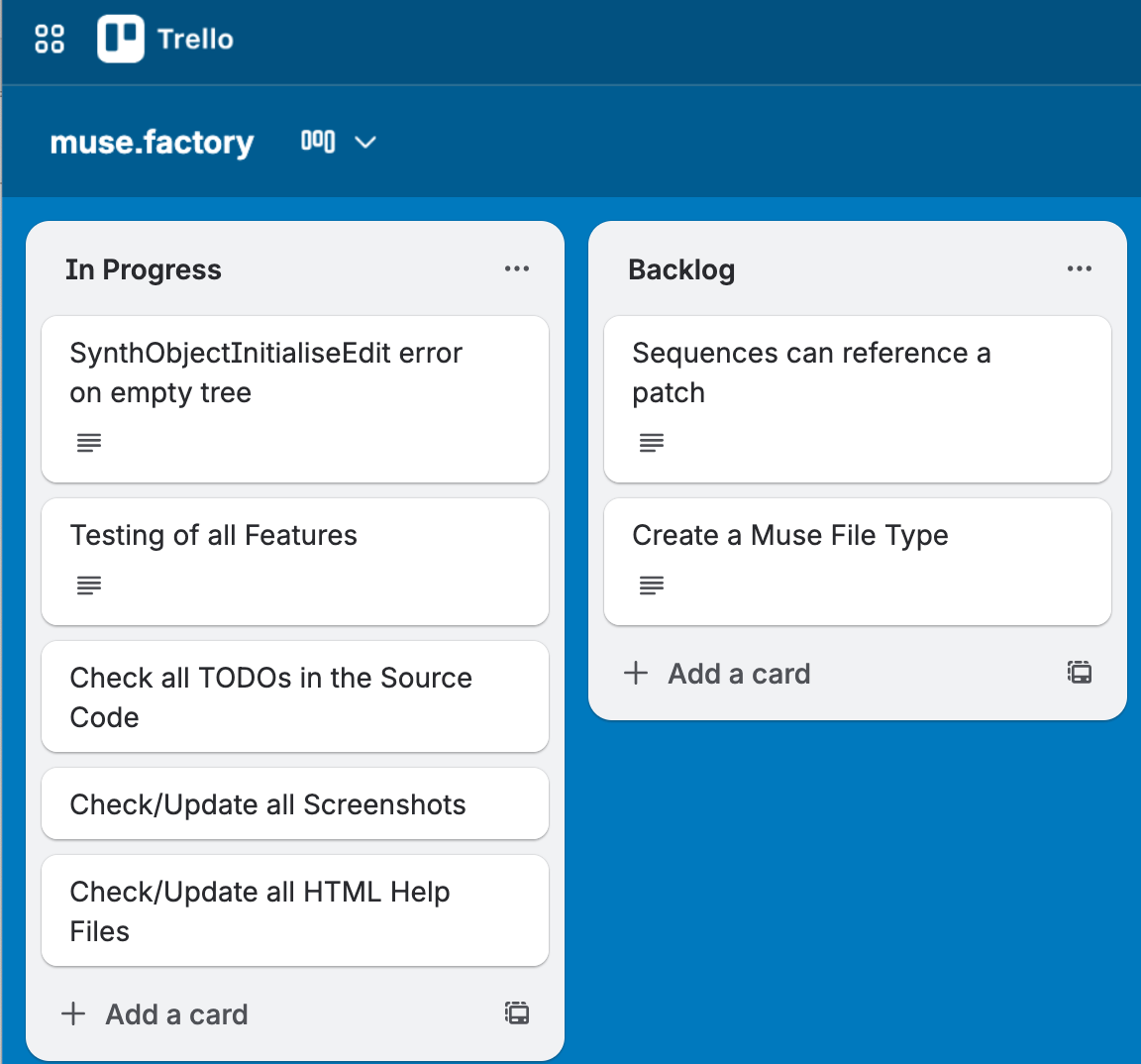
Thanks. After checking/updating my backlog of tasks (which I keep as a Kanban in Trello), I am getting into a good place. You can see from below that the In Progress Tasks list does not have many things left in it. The top item is an example of a bug I am chasing down, so things may get added if I find bugs and they are not a 5 minute fix. The Backlog list is for things I will look at after the first beta release, and of course I will be happy to take suggestions. If you haven’t come across them before, Kanbans are fantastic for sorting/ordering/prioritising tasks in a visual manner. You can put a lot more detail into each Kanban card.
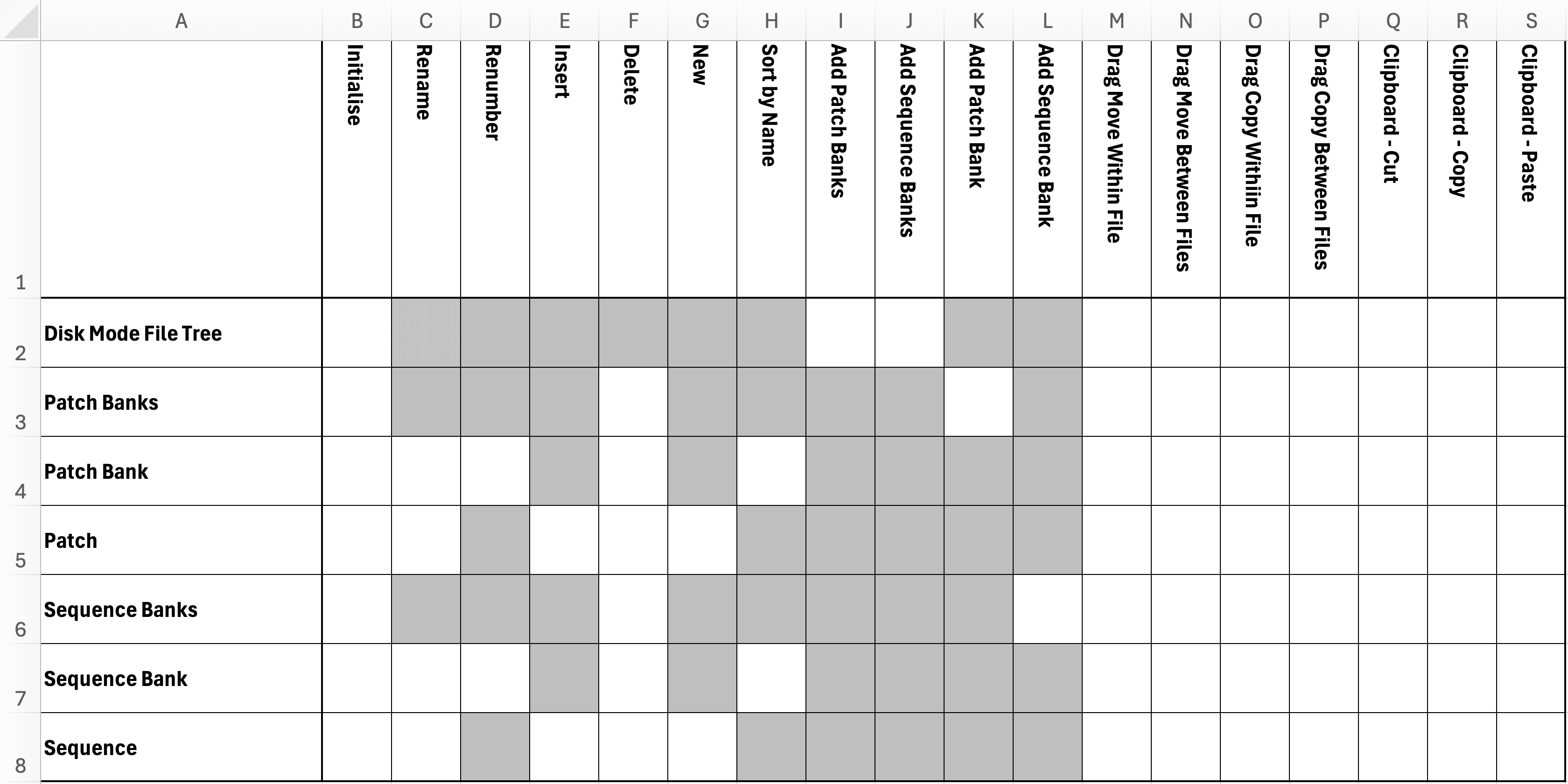
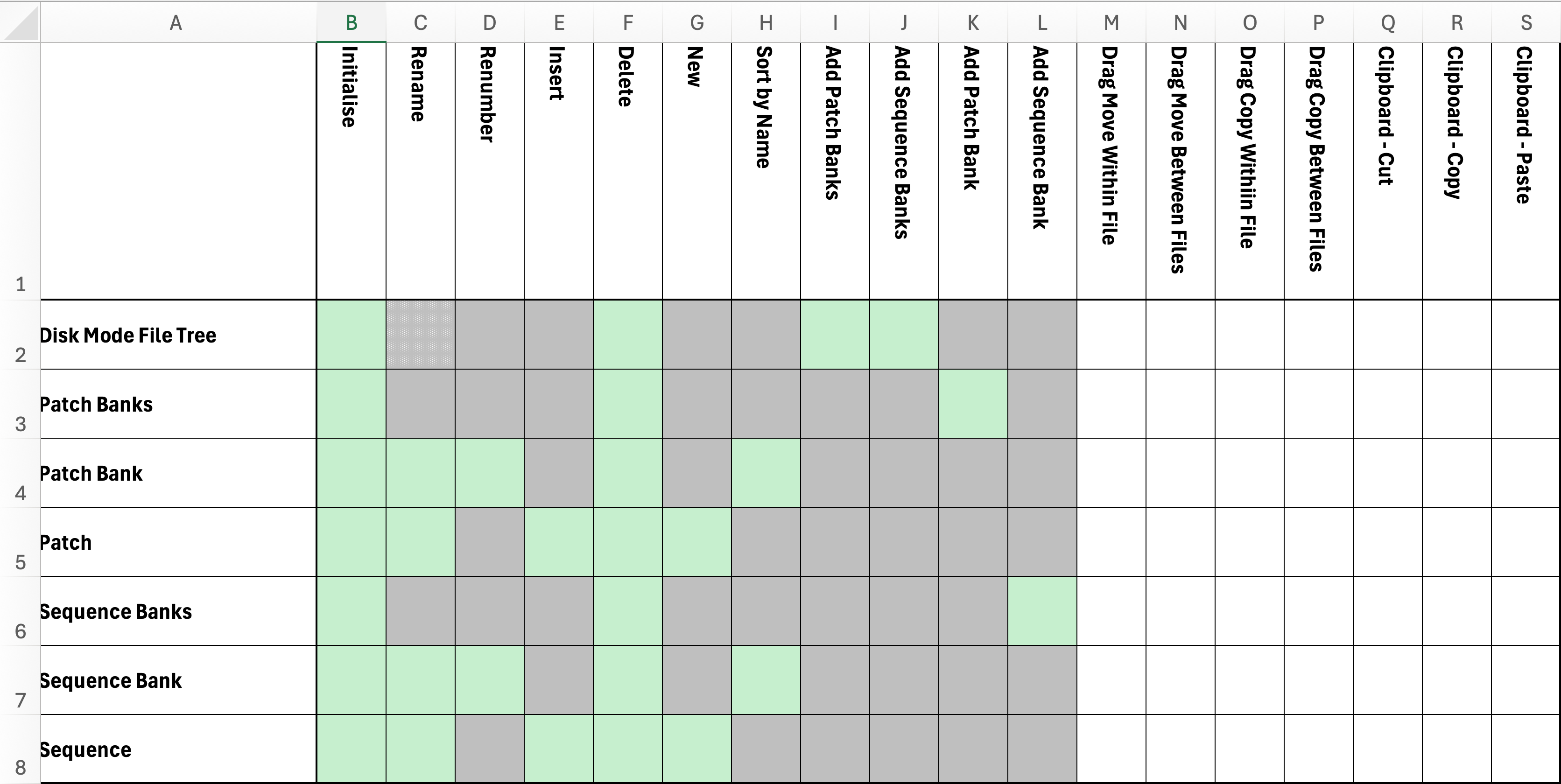
I have created my Test Sheet check-list, ready to run through testing of menu actions and drag and drop actions. This sheet gives you an idea of the features available. The grey cells indicate were features are not available for certain objects. E.g. you can rename banks and patches/sequences, but not the main tree branches.
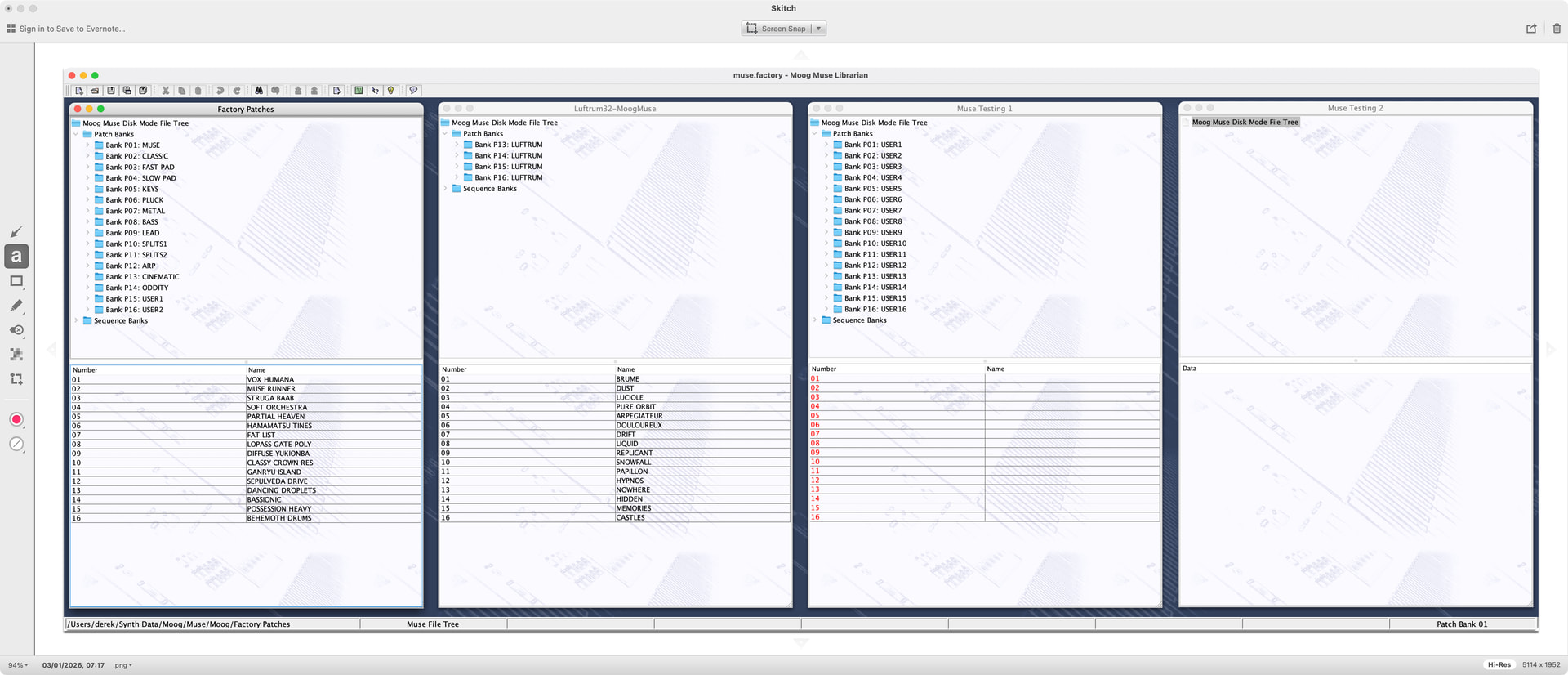
And I have created the Workspace for testing. A Workspace is a snapshot of open files and how they are displayed, which is a huge bonus when you are doing things like testing and other activities where you want the same files open with a specific arrangement, and be able to get back to that repeatedly! So below, I have the factory set, the Luftrum 3rd party set and two files specifically created in muse.factory (a way of testing the New feature!), with one that has a Patches/Sequences created and the other is completely empty.



 and reassuring to know it’s being tested across macOS, Windows, and Linux.
 ), and enjoy getting some time back for music recording as well!