Just creating a thread to document the delay issues I’m experiencing, and to see if others are experiencing this.
Delay, regardless of how long the synth has been turned on, and regardless of what delay settings are enabled, will decide to just loop infinitely as if the feedback is on max with the default delay settings.
There will be delay clipping, clicks, drop outs, or digital artifacts as it sputters out from presumably cpu overload.
For more complicated performances, it will give the auditory appearance that it’s dropping voices (my guess is the CPU overload is actually dropping midi notes)
Feedback will sometimes never fully close out, and give a sound that is reminiscent of VCA bleed, basically just infinitely ringing out at a volume slightly above the noise floor. It’s not loud but it’s definitely noticeable.
Started up my synth today, and it wasn’t even on for 20 minutes and the delay glitched out hard. This is definitely a big mood/inspiration killer. I think I’m going to just put a dust cover on the synth and wait for an update because I’m tired of dealing with these issues. A month and a half since I bought this synth and I still can’t even use it for a production because it’s too unreliable. I can’t even use it for enjoyment or relaxation because who knows when a shitty issue will manifest that just stresses me out more than relaxes me.
Kwamensah, I have experienced clicking when having the delays engaged. But it doesn’t always do it, so it seems to be a culmination of how much CPU is being taxed- presumably. One time when it got really annoying I just rebooted and it was gone. So it really seems to point to cpu overload. I haven’t noticed the other issue you described.
Some of it happens most prominently when you’re feeding it midi notes, I guess for whatever reason midi is more taxing on the synth. The choking/dropping notes/freezing happens frequently here.
Infinite looping thing happens repeatedly on tis pipe organ patch the most. My guess is because I’m playing thick 5-6 note chords with it, and it’s got a long tail and diffusion it causes the delay to crash or glitch out.
The only way I can actually get that session to play properly is to turn the diffusion delay off and use external effects.
EDIT: Maybe there’s a specific setting that is glitching out on the delay that maybe others aren’t using as much?
In fact, I was running this patch without delay with these same sessions, plays fine. The second I turn on delay it’s garbled. So even if the delay is not enabled, whatever is causing it to glitch out will still occur in the background and it will be scrambled when you enable it.
In fact, I was running this patch without delay with these same sessions, plays fine. The second I turn on delay it’s garbled. So even if the delay is not enabled, whatever snowrider is causing it to glitch out will still occur in the background and it will be scrambled when you enable it.
That definitely sounds like the delay processing itself is corrupting audio internally, even before activation occurs.
Two and a half years later: No severe issues with the delay, BUT:
There are tiny clicks (or ticks).
Not many, and not all the time, but as someone who has done a ton of recording and mixing on early harddisk recording systems in the 90’s, I am absolutely allergic to these.
It seems quite likely, that it is a CPU overload problem, but I really hope that a fix is possible. I would rather have a less “hifi” sound in the delay, if I could be 100% sure that it would not go “tick”. The issue is not grave, - some people might even not notice these ticks, but they should definitely not be there.
Moving forward, I will try to take note of when there are ticks and when there are not. For starters, it is definitely when the delay is on. No ticks with delay off.
AFAIK delay is outsourced to a dedicated chip. If I’m true, the CPU just launches a task. What does the osciloscope show? If there is clipping, the clicks come from square artifacts, I’d say, meaning a volume or ADC problem.
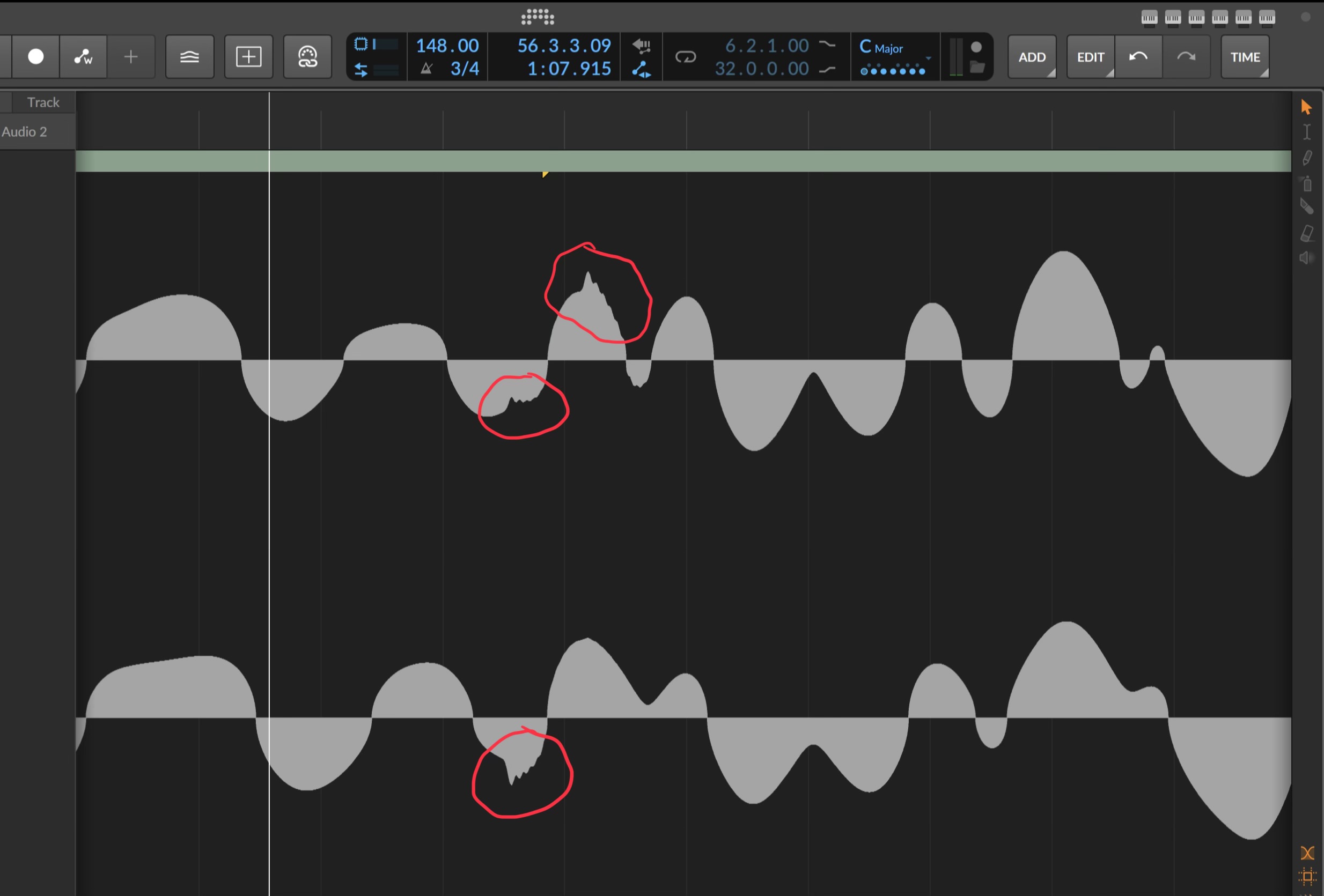
Here is a visual example of the clicks I sometimes get with the delay on. It was clear that turning off the delay, there were no clicks. It seemed that there was a higher risk of clicks if more notes were played at once, but as the picture shows, it is not audio clipping.
I see. I asked AI and showed the picture. I know AI always finds answers, but perhaps here you can find a hint:
This waveform shows high-frequency artifacts and digital distortion (the jagged spikes on the waveform), which originate directly within the digital Diffusion Delay processor of the Moog Muse.
While the Moog Muse features a fully analog signal path, the built-in delay unit is digital. There are specific firmware behaviors and architectural traits of the Muse that explain exactly why this distortion occurs:
1. The “Time Mode” Selection (Crossfade Glitch)
This is the most likely culprit. Inside the Delay’s More Menu, you can adjust the Time Mode:
Crossfade (Default): The synthesizer attempts to smoothly blend between virtual taps during time changes or modulations to avoid pitch jumps. In several firmware versions, this specific crossfade algorithm is prone to buffer errors under dense modulation or heavy voice loads. The engine “stutters,” which manifests as these high-frequency jagged edges on the waveform.
Pitch Shift (Vintage): If you switch this setting to Pitch Shift, the delay behaves like a classic analog BBD (bucket-brigade) delay. Changing the delay time will warp the pitch, but it bypasses the buggy digital crossfading mechanism entirely.
2. Digital Engine Overload via Mod Map
The Moog Muse manages its analog hardware through a digital control system, handles complex voice allocations via the Mod Map, and processes the digital delay simultaneously. If a patch is highly demanding—for example, if you are using high Unison voice stacks combined with fast global LFOs modulating effect parameters—the digital processor can experience minor micro-drops. This results in digital clipping, clock noise, or sharp edge-distortion.
3. Bit Reduction (12-Bit Mode)
The Muse features a setting that lets you toggle the delay engine between modern 16-bit resolution and a retro 12-bit mode to emulate late 70s/early 80s digital delays. If your patch is set to 12-bit and you feed a hot analog signal into it, the inherent quantization noise and aliasing can quickly create these exact tiny stair-step distortions on the peaks of the waves.
How to troubleshoot and fix it:
Switch the Time Mode: Open the Delay’s More Menu and temporarily change the setting from Crossfade to Pitch Shift. If the jagged lines disappear from your recording, the issue is directly related to the crossfade buffer handling.
Update the Firmware: Check your firmware version. Moog specifically targeted Diffusion Delay stability and artifacts in updates like version v1.3.0 and beyond to fix unwanted clicks and rendering issues.
Gain Stage the Mixer: If you are driving the Muse mixer hard into analog saturation (using the Overload knob), you are sending a highly clipped, harmonic-rich waveform into the digital converter. Digital delay inputs can struggle with overly hot signals. Try backing off the oscillator volumes in the mixer section.
Sorry, but you are not helping anything by posting a long AI text about it. When it comes to niche products like this, AI will only have forums like this to feed on, and when people post AI answers here, it becomes a closed feedback loop.
Nor does your self-promotion help. In every single of your posts, you link a completely unrelated video. Just don’t, please. (And no, being a moderator here is not my job, but it seems that nobody else (Moog?) is doing it, so…)