I am moving to a new PC and want to deauthorize my Mariana plugin, so I can then activate it on the new PC. When I select the ‘Deauthorize’ option, I get the following error message, whether I select it from the VST or from the standalone version. Any ideas?
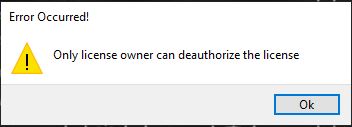
No explanation but they deactivated it for me, so I suppose that’s something. (BTW, evidently you now need to report problems via their ticket system, not to the old appsupport@moogmusic.com address.)
That error usually means the plugin isn’t currently logged in under the original license account that was used to activate it. Make sure you’re signed in with the exact Moog account that purchased/registered the license before trying to deauthorize.
If you’re already logged in with the correct account and it still shows that message, it could be that the activation is tied to the machine ID in a way that prevents local deauthorization. In that case, your best bet is to contact Moog support directly and ask them to manually reset the activation on their end — they’re generally pretty responsive with license transfers when moving to a new PC.
Before reaching out, you might also try running the plugin/standalone as administrator, just in case it’s a permissions issue.
fnaf
Well I doubt I would have more than one Moog account, since this is the only desktop Moog product I have bought. That said, from the start I had some kind of authorization problem with the standalone version. That meant it would take literally minutes to start up, as it had to wait for some timeout. I forget the details, but I think there was also some problem with the initial authorization on the Moog store, so maybe that’s the reason.
Anyway, like I said they fixed it and it runs propery on my new PC.