Assumed that a bank dump should be just a collection of single preset dumps, so it would be possible to quickly extract (by software) the 128 presets of a bank dump. Surprisingly, the format of bank dumps appears to be completely different. Is there a specification of the bank dump format ?
Send a message to Moog support, no reply.  Wonder why is the Bank dump Sysex format so secret.. Apparently SoundTower has it.
Hi music.maker,
it’s not a secret:
http://www.moogmusic.de/SysEx.pdf
Rudi
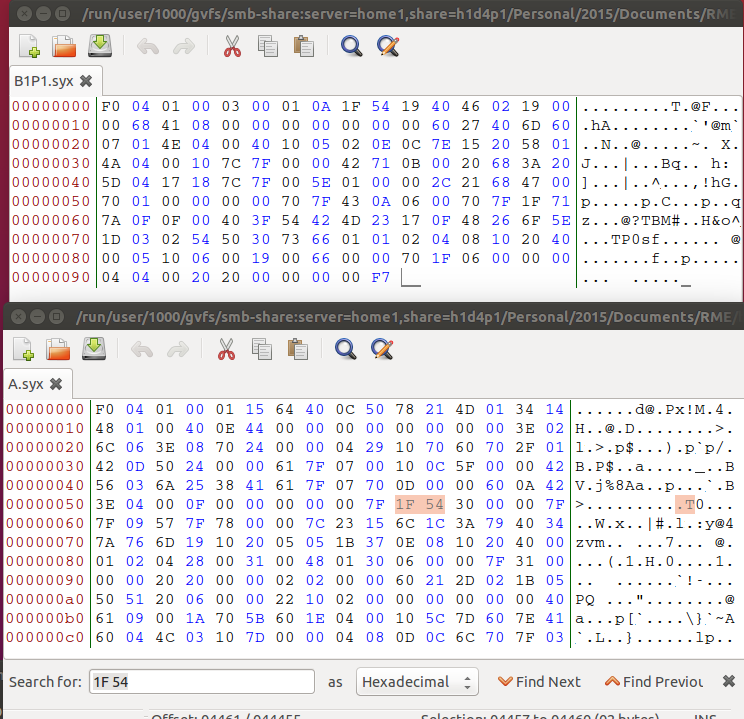
@RL, yes, thanks for that.I got that one. The issue I have is that a single preset dump is a standard SYSEX format enclosed with start of sysex and end of Sysex, However, you you look at a bank dump, it is only one SYSEX which should have have all the single presets of that bank inside. That is ok, but if you further look at the bank dump data, you won’t find the same data bytes of the single patch in that bank dump patch. This is what confuses me. an example from the original factory banks. Above the single preset and below the start of bank
The single Bank A and first preset starts with F0 04 01 00 03 00 where 00 s the preset number (00) and the first data byte is 01.
The bank A dump start with F0 04 01 00 01 and after that you would expect the data of the first preset, which is not the same as the single preset data.
Hi music.maker,
there is an additional byte (the preset number) in the single preset dump. The System Exclusive format sends 7 bits instead 8 bits cause bit 7 always must be zero. And that means bit seven of the preset number is on position bit 0 of the second sysex byte (the first preset data byte).
Have fun,
Rudi
Many thanks Rudi for this eye opener ! Going to do some bit crunching and check this out…
I have a question which might be distantly related:
How do I get the patch names out of the sysex data? All my efforts lead to scrambled names …
The implementation chart lists Byte 102 for “preset name 1 D0” and that works for me, it’s always the right ASCII char.
103 to 109 look scrambled while 110 is good again.
I think it has something to do with the D0, D1, Dn, D7 declaration from the implementation chart table head, but I don’t get what that means. Is that related to device id?
May be I have a general misunderstanding how that works, can someone give me a hint how to extract the patch names?
In the meantime I have figured out that the data is somehow encoded in 7bits per byte and needs to be converted to 8bit/byte and via versa.
Still would be great to have a source with more information about how to do that.
Is that the “Packed Data Format” with the stripped MS bits which Dave Smith uses or something different?
I have not seen a Dave Smith MIDI Sysex documentation. But the way the Voyager does is the way with the least bytes needed to do this needed 7 bit format of MIDI transmission.
You have to combine the needed bits in the 7 bit words. With this sysex documentation it is easy to do if write a little code for this job.
Thanks, I think I have understand it.
Look here for explanation of the Dave Smith implementation. In contrast to the Voyagers sysex there is also some wizardry with most significant bits involved.
http://www.manualslib.com/manual/640059/Dave-Smith-Instruments-Mopho.html?page=65#manual
Can you elaborate on the 7 bit conversion? looking at the document, the characters are actually split between bytes, so you would have to stream several of the bytes together in 7 bit chucks, then unwind it in 8 bits? I’m on a slightly different track looking for something like this document for the Taurus 3, and assuming Moog used the same algorhythm, Do you have this coded such that you could provide an example?
Check this question on Stackoverflow.
It’s about the decoding (7 to 8 bit) for an Alesis synth, but I found out it works for the Voyager too.
I have added my version of an encoding (8 to 7 bit) to the same question as a comment.
Hey guys
After a full day of bit crunching, I found this thread which seems to be pretty recent. Well, better late than never 
My motivation to reverse engineer Voyager .syx files is that I designed and built my own analog synth from scratch, using old Moog schematics as well as other circuit designs. I was inspired from the Voyager when it first came out, so my synth has almost all features of its archetype as well as some alterations and extras. To load it with some initial presets as well as to be able to compare it to the original, I would like to use the Moog factory presets. Since I don’t own a Voyager, I found techbuzz’s dumps here: http://www.maxforlive.com/library/device/3039/voyager-with-patch-memory-recall
What I figured out so far was to do the 7 to 8 bit conversion and I also constructed a first simple version of a grammar file for the “Hexinator” (Mac version “Synalyze IT”) hex editor according to the same Voyager SysEx format documentation as linked above. Since I am not used to binary file manipulation, I used a rather complicated toolchain including the “Text to Sysex” tool to convert the .syx to .txt which I then imported to excel to do the conversion and then the same way back to a .syx files. This lead to a number of mistakes in the conversion formulas, but I found the patch names helpful to finally see all patches and be sure to have done the conversion right. The grammar file takes care of the SysEx Start byte as well as the Message Header consisting of four bytes.
According to the documentation, there shouldn’t be a “preset prog-no” byte in a full preset dump. This results in 142 bytes per preset. Converting these from packed midi bytes to 8 bit data bytes results in 125 actual bytes. However, after modulating the preset structure as a grammar file, I soon figured out that a preset is actually 128 bytes long. The patch names helped me out again, since they shifted away from the assigned 24 byte string for the name. What I figured out is that these 3 extra bytes have to be located ahead of the patch names, since this leads to the first letters of long names also being the first assigned to the name string. But other than that, it is probably guesswork where they fit in. Maybe somebody with an actual Voyager could check his settings with this example (patch name “FiltOrgNasty(WheelUp)”) and find out more (keep in mind that most potentiometer settings are stored as 16 bit NRPN values, so you have to cut away the last 8 bits and convert to decimal if you want to see a normal CC value):
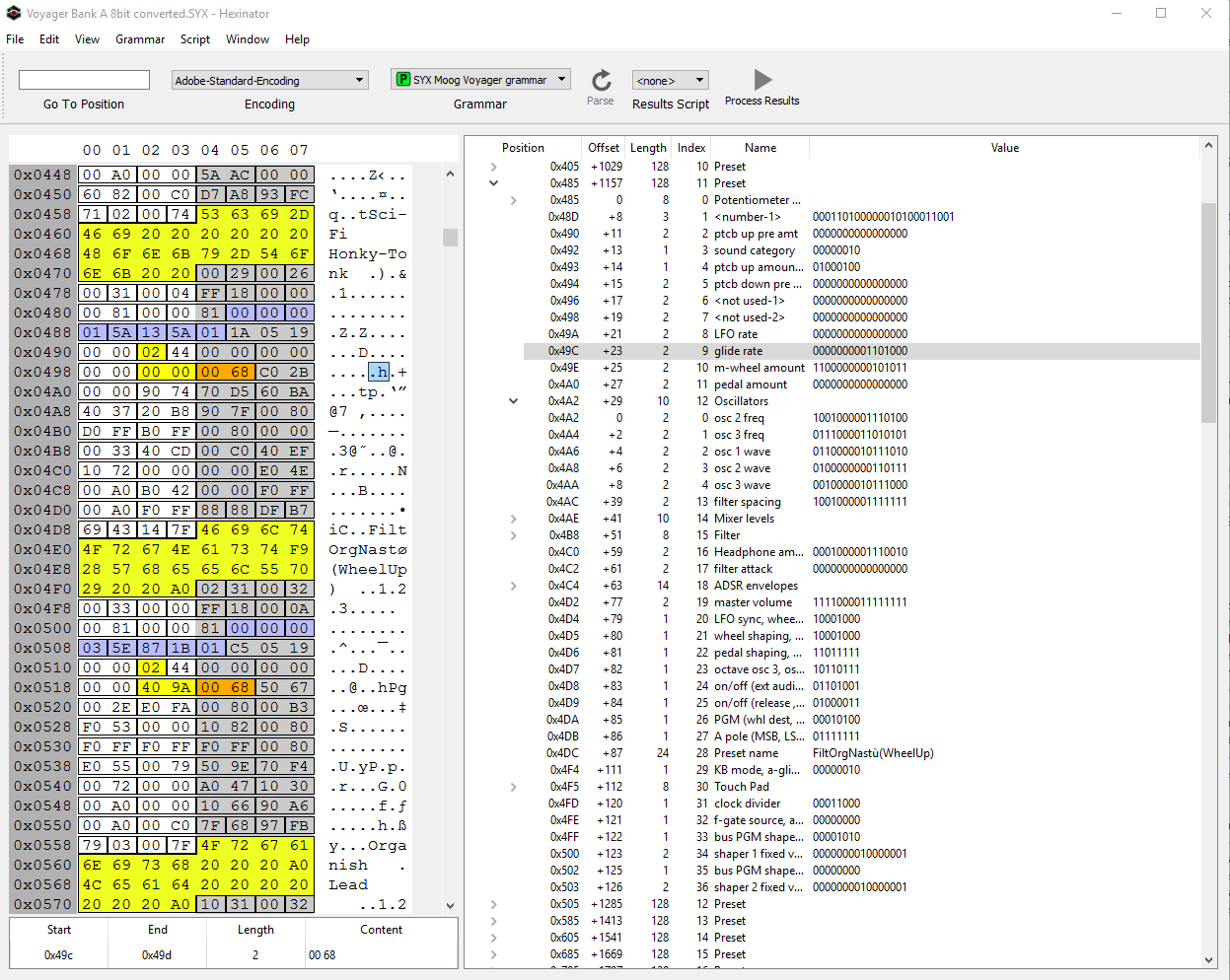
One thing I also don’t get is what type of character encoding is used for the patch names. As you can see on the print screen, “Nasty” has a typo. Unfortunately none of the about 30 supported encodings result in the correct character.
Of course, I am happy to share my current results:
Grammar structure file https://1drv.ms/u/s!AioTq3GZKEDxowcxZsSDSK9OFq8h
Converted Bank A to 8-bit https://1drv.ms/f/s!AioTq3GZKEDxowoeILQkfnKQIZlo
I am looking forward to hear how far you got since the last post.
Regards,
Andy
Hey,
since then I programmed a SysEx librarian for Voyager in Javascript.
You can request the soundbank via MIDI, view and edit the patch names and store them back into editbuffer or program slot.
That is fully working and you can see it on https://f0f7.net
You can import/drag’n’drop your sysex files from your hard drive and the names should be displayed.
If you have a MIDI interface attached you will also see the 7bit hex/text content of a program when you click on it. (enlarge the browser window → top left)
Maybe that can help you debugging?
I am not sure what you trying to do with Excel and that grammar file.
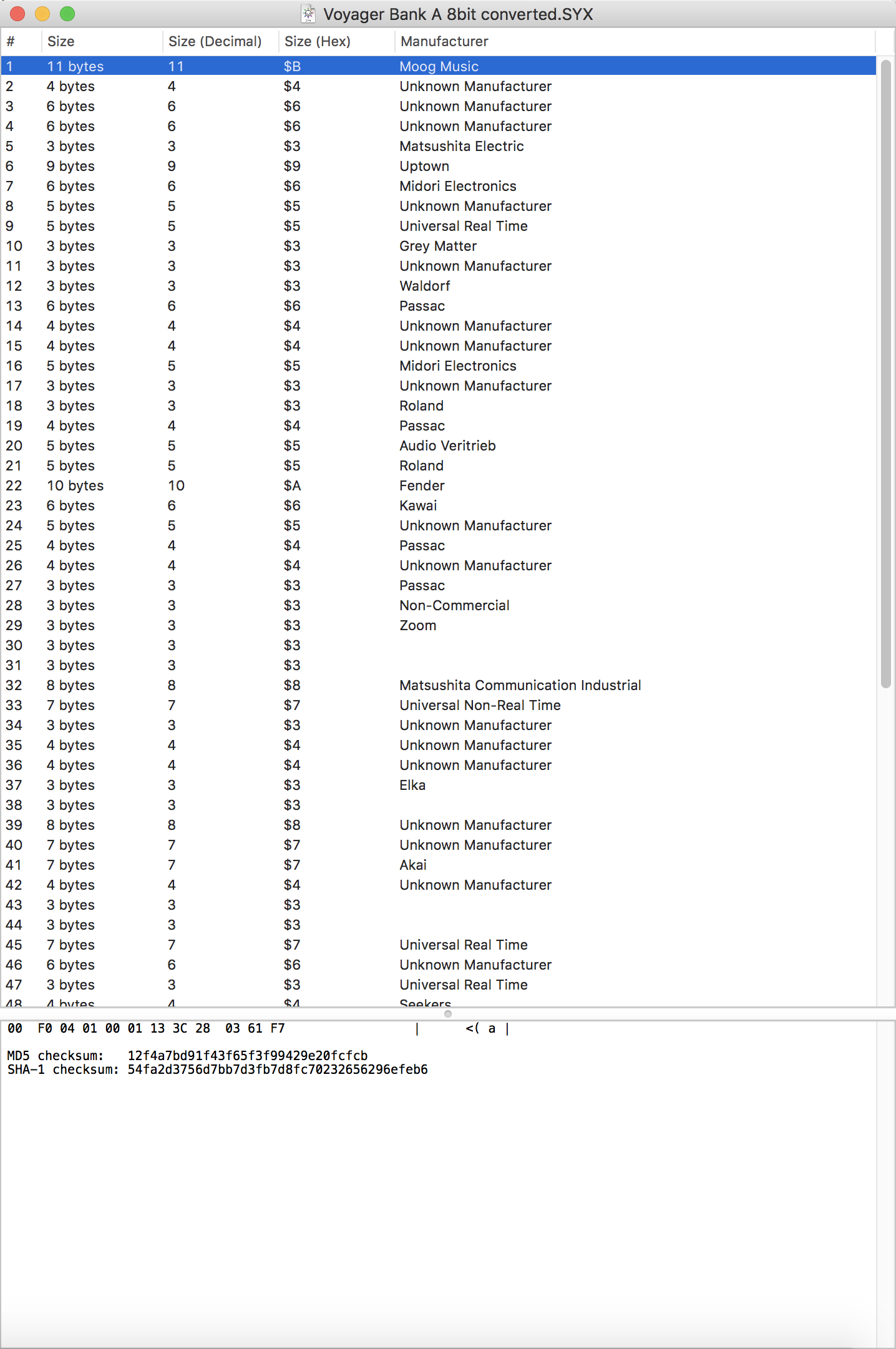
I have opened your “Converted Bank A” in the MacOs SysEx Librarian and it does not look like a valid Voyager sysex program. More like random segmented MIDI messages from different manufacturers. But maybe I have understood something wrong …
Hey,
Trying to upload an original .syx file (dump from a Voyager) into your SysEx librarian resulted in the message “I expected a different amount of programs.”
What I try to do is somehow extract the actual preset settings and values from SysEx dumps, so I can then generate my own SysEx files for my self made Synth. The only tools i found to be capable of doing such a thing are Hex Editors. With for example “Hexinator” I can generate grammar patterns which parse the file and output the different preset settings. Unfortunately, Hex editors don’t understand 7bit midi messages and therefore I had to remove the D7 0bit and regroup the bit stream to proper hex bytes. That’s what I used excel for, since I am no programmer and didn’t find an out of the box solution for doing that. The “Voyager Bank A 8bit converted.SYX” file is such a corrected file. The .syx ending is probably a bit misleading, since it doesn’t consist of proper midi bytes anymore. So you won’t be able to properly load it with the MacOS SysEx Librarian.
Any thoughts on that as well as where the surplus 3 bytes could fit in?
Regards
Hi all, thanks for this, but I can’t seem to use it to decode a Voyager sysex bank. A sysex sysex bank is a single sysex message of 18732 bytes (exluding F0 and F7). It you substract the first 4 bites for ID, and command (04 01 deice 01) you get 18728 bytes for patch info. If you divide this number by 128 (the number of available patches in a bank) you get 146.3 bytes.. already strange that’s not a round number of bytes.
Each patch, without header or patch number info, it’s supposed to be 143 bytes long according to the sysex spec (http://www.moogmusic.de/SysEx.pdf), so the total patch info in a bank should be 18304 bytes long, short 428 bytes of the actual bank data.
If you add 1 byte per patch for patch number (you don’t need 8 bits as patch numbers only go up to 128, so 1 “sysex” byte of 7 bits should suffice), a bank should use 18,432 bytes, still short of the total number by 296 byes. Even adding 1 byte + 1 bit, or 2 bytes for patch numbers, the total is still short (280 and 40 bytes short).
I’ve tried too many combinations, decoding different subgroups of the the bank data according to www.moogmusic.de/SysEx.pdf, with strange results, but no success.
Does anyone know how to split the 18728 bytes of a Voyager sysex bank into 128 sysex patches which follow the sysex decoding map from here www.moogmusic.de/SysEx.pdf? Or if we should use a different mapping to decode a sysex bank?
Thanks again
Hi,
A bit late in the game, but after many attempts, I think I decoded the secret format of Voyager bank dumps. A bank dump is 18,732 bytes long (exlcluding the initial F0 and F7). Each patch should be 143 bytes long according to www.moogmusic.de/SysEx.pdf (excluding header info, 4 or 5 bytes), so you already see theres a problem: 143 (bytes per patch) x 128 (patches)=18,304, much less than the bank dump.
I found that patches are byte- and bit-shifted within the bank data. Patch 1 starts on byte 7 of the bank dump (counting from starting byte=0), bit 3 (counting bits 0 to 7 for right to left). Patch number 2 starts 146 bytes and 2 bits afterwards, i.e. byte 154 (again starting from 0), bit 5 (starting at 0 on the right). To convert these “hidden patches” into proper patch sysex data, you have to compensate the bit offset, cosidering that always bit# 7 should be zero. I have no idea what info is in these extra bytes in the bank dump (e.g. from byte 4 to 7, of the extra bytes within the patches). If somebody finds out, please let me know!
I wrote a python function that does just this. I copy it here for better understanding of the details. The function receives the bank dump as a list of integers (mido can easily do that), and returns patch data as another list of integers 143 integers long. As far as I know right know, I think that to decode these bytes you have to use the “Voyager System Exclusive Single Preset Dump Format” (as opposed to Panel Dump Format) detailed in www.moogmusic.de/SysEx.pdf. So add the first 5 bytes (header + patch number), and treat these 148 bytes as a Single Preset Dump.
In order to read the Patch name, you can use this SysEx.pdf document, and look at byte #102 of the PDF document Single Preset Format (byte 96 within the 143-long data without header) and decode from there.
Hope this helps!
def unpack_bank_voyager(packed_bytes, patch_nr=1):
import bitstring
from bitstring import BitArray, BitStream
bitstring.lsb0 = True
if len(packed_bytes) != 18732: #this is the size of a vogager bank (excluding F0 and F7)
print (‘Wrong Length’)
return None
if patch_nr -1 not in range(128): #patch numbers must be 1 to 128
print(‘Patch Number must be 1 to 128’)
return None
first patch info within the bank data is at byte 7, with 3 bits offset: starts at !: 0000!000
start_bit = (3 + (patch_nr -1)*2) %7 #distance within patches is 146 bytes and 2 bits. This one for shifting the bits
byte_offset = (3 + (patch_nr -1)2) // 7 # this one calculates bytes to move based of the 2 bits each patch adds
start_byte=7 + (146(patch_nr-1)) + byte_offset
patch_data_len=144 #1 more than needed, for the extra bits in byte 144
bit_array=BitArray()
for i in range(patch_data_len): #create bitarray, adding all the 7 bit bytes together (higher byte nr to the left)
bit_array.append (BitArray(uint=packed_bytes[start_byte+i], length=7))
del bit_array [:start_bit] #offsets bits to the right so the bitarray starts in bit #0 as it should
bit_array.append([0]start_bit) #add 0s at the beginning, the # of removed bits on the right
patch_data=[0](patch_data_len-1) #143 is the patch packed data length
i=0
for byte in bit_array.cut(7):
if i==143:
break
patch_data_=byte.uint
i +=1
return patch_data_
Hey that’s useful, thanks for posting