I am just downloading the 1.1.27 to see if the problem persists.
Ok ive upgraded to the 1.1.27 firmware that Amos posted to try to solve this issue.
I would say that in Ableton it appears to function in 2 different ways, if i turn the actual hardware knobs on the sub the lanes get recorded under the name midi cntrl. If I use the mouse and turn the knob on the vst editor the lanes get recorded as Sub 37 / name of control. I have successfully recorded 3 lanes with the mouse.
Of course ideally A user would want to twiddle the hardware and the lanes get recorded as sub 37 / control name, then once recorded that info sent back to the editor where one can see the software knobs turning.
I hope that makes sense.
if not then pm me and i can explain maybe via telephone.
you can see from the screenshot whats taken place and now you have the explanation as to my physical actions hope that helps.
The setup was external instrument in midi track with midi set to same midi as sub and audio set to correct interface channel.
the sub 37 vst 32 was then dropped onto the same midi track to the right of the external instrument.
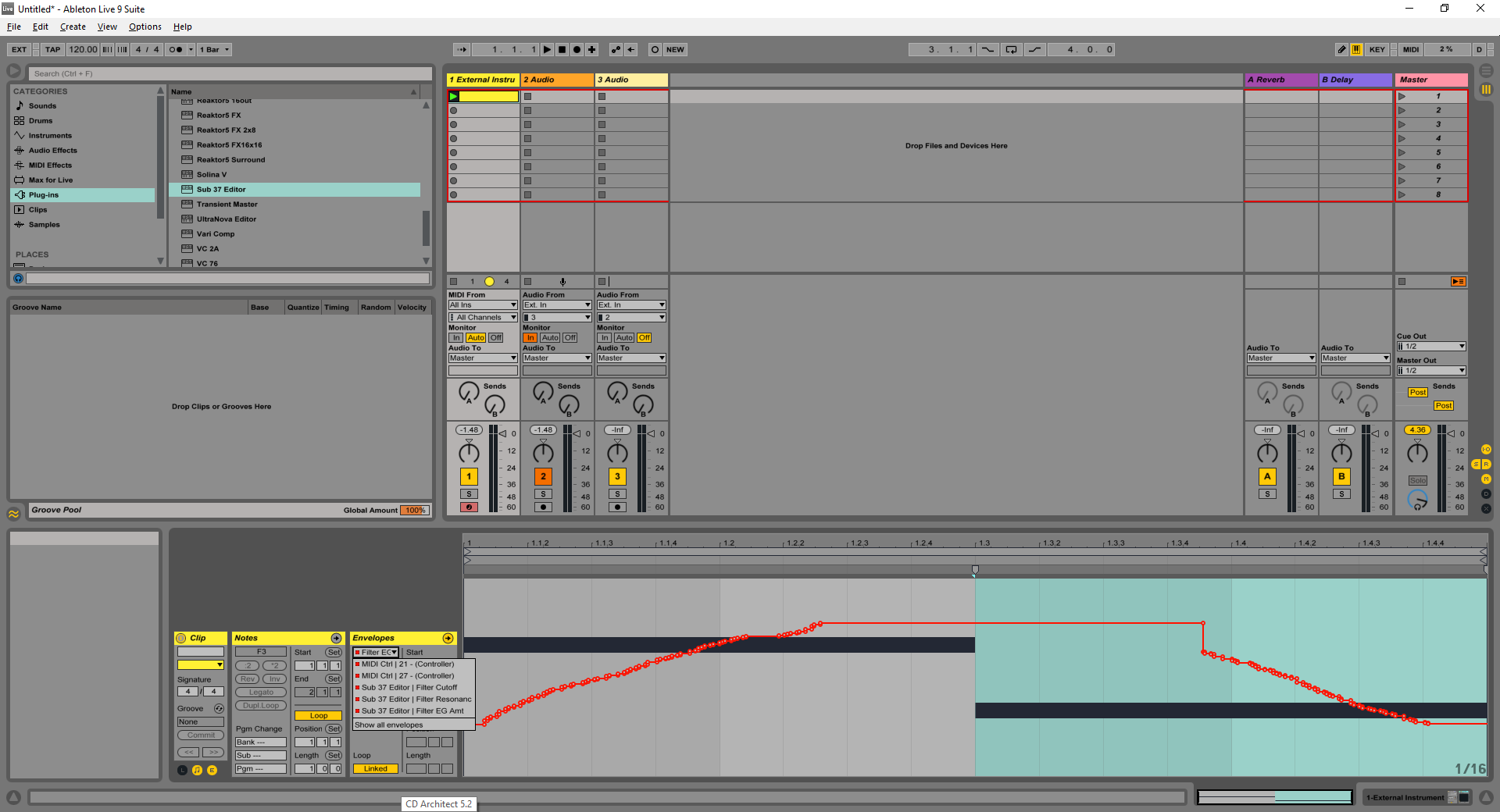
Hey Amos I’m just installing now
will let you know how I get on
MESA
After installing the Mac version of the test installer (1.1.27) my automation stopped working completely. If i move a knob on the hardware the editor and the synth respond accordingly, but if i draw in automation the editor would follow the automation (i.e filter knob would move according to my automation) but it seems as if the midi isn’t being passed through to the sub 37. The midi light would only respond to the notes and not the automation. I reinstalled 1.1.25 and back to normal.
Cannot confirm this; I wonder if the problem was really just resolved by turning the Sub 37 power off/on to re-establish connection. I’m testing editor v0.9.47 and firmware v1.1.27 and automation is definitely working as normal for me. If the plug-in happens not to be passing MIDI to the Sub 37 then of course the Sub 37 won’t respond to automation, but that would be true regardless of firmware version.
Can anyone else test and confirm (or not) that automation works for them using firmware v1.1.27? I’m concerned about this negative report but I strongly suspect there was some confounding factor making it seem not to work, that was not inherent to the firmware itself.
Or perhaps, Ndoe, you could try again with the newer firmware, making sure to turn the Sub 37 power off/on again after completing the firmware update and before testing if automation is working? If you have time to try this at some point I’d be very appreciative.
Thanks!
Amos
As a general rule i usually power cycle the sub 37 after an update but I am not 100% positive i did. I am at work until 4 pm Central. I will test again when i get home and let you know.
Ableton already allows you to set it up in the ideal way. Just think about how it would be if you had a generic knob controller and a third-party plug-in, and you wanted to turn knobs on the hardware and have it control parameters of the plug-in. You have to tell Live about this association, by setting up MIDI mapping.
Type Command+M (Ctrl+M) to enter MIDI mapping mode, click the knob in the plug-in that you want to automate, then turn the hardware knob you want to map to the plug-in knob. Live will create a MIDI mapping, which tells Live that the MIDI from the knob should be recorded only as parameter automation, and not recorded as a “MIDI cntrl”.
It works the same way with the Sub 37 plug-in. If you don’t tell Live that MIDI from the Sub 37 should be associated only with the plug-in, then Live records it as regular MIDI on the MIDI CC automation lanes, rather than only recording it as plug-in automation. One note, I think you also have to make sure that REMOTE is enabled for the Sub 37 MIDI input, on Live’s MIDI settings page, before setting up MIDI mapping like this.
Try this and see if it works the same for you as it does for me.
ok It was a different way but i mapped out three as you mentioned, it stopped at two and greyed out the 3rd, it did record the 3rd but greyed out once i stopped recording.
seems less of a success than others who can get three.
So i reinstalled 1.1.27 and it appears it is functioning despite my earlier post. The problem is now instead of ableton automation issue after 3-5 lanes now if i drop down to my second automation lane the automation line stops following and turns to a red dashed line. The red dashed line is normal when my stops following is just stays red dashed and i can’t get my connection back %100 unless i delete and drop a new instance in. While the automation line doesn’t move after this it still will bring the parameter i am moving on the sub to the automation lane.
The problem i had with ableton flashing the automation lanes after adding 3-5 lanes doesn’t seem to happen in 1.1.27. I had 7+ automation lane visible and the main channel that contains the plugin wasn’t flashing so that so far seems to be fixed.
This is my work flow, setup channel with plugin, make 16 bar midi clip, press play let it loop and turn a knob on the sub, drop automation lane down and the draw automation with mouse. then repeat.
Ndoe,
This is a wild guess, but are you using the MIDI ports on your MOTU MK1 for your connection?
The reason I ask is that I have a MOTU Micro Express and have had compatibility issues with some of MOTU’s MIDI / USB drivers (not with Moog products, but with Strymon). I know you’re using OSX and I’m using Windows, so it’s somewhat apples to oranges, but just a thought.
Good luck!
I have been using the USB for the beta testing